
SIP Trunking with PBX Systems: How It Works, Compatibility & Migration
Most businesses can connect SIP trunks to the PBX they already own, and the right migration path depends on which language that PBX speaks.
- A PBX runs your internal calling features, while a SIP trunk replaces the phone lines or PRI circuits that connect it to the public network.
- IP PBX and SIP-enabled systems connect directly, while older digital and analog systems connect through a gateway or analog telephone adapter.
- A clean cutover depends on a short list of prerequisites: bandwidth, firewall settings, trunk authentication, number porting, and 911 configuration.
- Replacing the PBX only makes sense when it’s out of support, can’t be bridged, or no longer fits how your team works.
Before you price new hardware, confirm what your current PBX supports. Keeping it and changing the connection is usually the faster, lower-cost move.
SIP trunking with PBX systems lets you keep the phone system your team already knows while replacing the aging lines behind it. The PBX keeps handling extensions, auto attendants, and call routing, and the SIP trunk carries calls to and from the outside world over your internet connection.
That pairing is still the most common way businesses modernize voice. On-premises deployments held about 75% of the SIP trunking market share in 2025, largely because organizations want to extend the life of PBX equipment they’ve already paid for. The same research puts typical savings over legacy PRI lines at 25% to 65%. If you’re evaluating SIP trunking with PBX equipment in your own office, this guide covers how the connection works, how to check compatibility, what to configure, and when a PBX upgrade is the smarter call.
How Does SIP Trunking With PBX Systems Work?
SIP trunking works with a PBX by replacing the lines behind it, not the phone system itself. The PBX still routes calls inside your organization, and the SIP trunk carries them to and from the public switched telephone network (PSTN) over your internet connection.
What Is a PBX?
A PBX, or private branch exchange, is the switching system behind your business phones. It connects internal extensions, routes inbound calls to the right person, and powers features like voicemail, call queues, and auto attendants. Older systems are hardware cabinets, while modern IP PBX platforms run as software.
What Does the SIP Trunk Handle?
A SIP trunk is a virtual connection that uses Session Initiation Protocol to set up, manage, and end calls over IP. It replaces the analog lines or T1/PRI circuits that used to tie your PBX to the carrier. Capacity is measured in channels, one per simultaneous call, so you scale by adjusting channels instead of ordering circuits. For a deeper primer, SIP Trunking Benefits and Best Practices covers the fundamentals.
How Does a Call Travel Through a PBX SIP Trunk?
An inbound call crosses the SIP trunk to your PBX, which sends it to the right extension based on your dial plan, and outbound calls take the reverse path. Your users keep the same phones and features because the change happens only at the edge of your system.
Is Your PBX Compatible With a SIP Trunk?
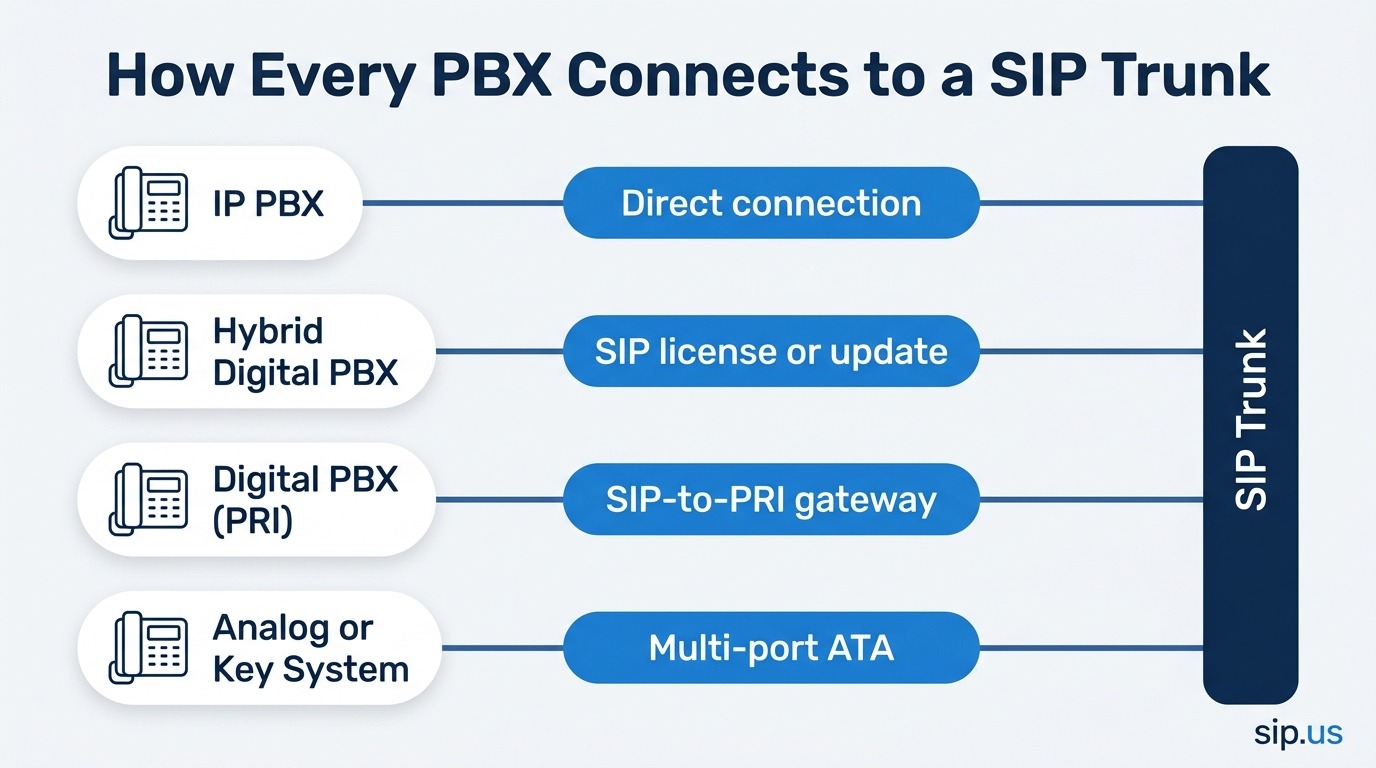
Almost every PBX can work with a SIP trunk. Newer systems connect directly, and older ones connect through a gateway or adapter. The only real question is whether your PBX speaks SIP natively or needs a translator, and the table below shows where each type lands.
| PBX Type | Speaks SIP? | How It Connects | Typical Extra Equipment |
| IP PBX (software, virtual, or appliance) | Yes | Registers directly to the SIP trunk | None beyond a configured firewall |
| Hybrid digital PBX | Often, after an update | Direct SIP once enabled | SIP license, firmware, or IP card |
| Digital PBX with PRI/T1 ports only | No | SIP-to-PRI gateway | Digital VoIP gateway |
| Analog PBX or key system | No | Analog telephone adapter | Multi-port ATA |
Do IP PBX Systems Need Extra Equipment?
No. An IP PBX SIP trunk connection needs no added hardware, which makes it the simplest scenario. Platforms such as Asterisk, FreePBX, 3CX, and current releases from Cisco, Avaya, Mitel, and NEC support SIP trunking out of the box. A SIP PBX in this category usually needs only trunk credentials and inbound and outbound routes, and it can often be connected and tested the same day. Businesses running Switchvox and Asterisk systems have reported getting trunks working in a matter of minutes through a provider’s online interface, including owners with no prior SIP trunking experience.
Can Older Digital and Analog PBX Systems Use SIP Trunks?
Yes, with a gateway or adapter in between. A digital PBX with PRI ports can connect through a SIP-to-PRI gateway, which presents the trunk to the PBX as if it were still a T1 circuit. Analog PBX and key systems can use a multi-port Analog Telephone Adapter to convert SIP into analog lines. This overview of SIP trunking for legacy PBX systems goes deeper.
How Can You Check Your PBX Quickly?
The fastest check takes about five minutes: look at the back of the unit, where an Ethernet or data port is a good sign, and analog line ports alone usually aren’t. Then look for a SIP trunk section in the manual or admin interface, or ask a provider to confirm compatibility from the make and model.
When Can You Keep Your Existing PBX?
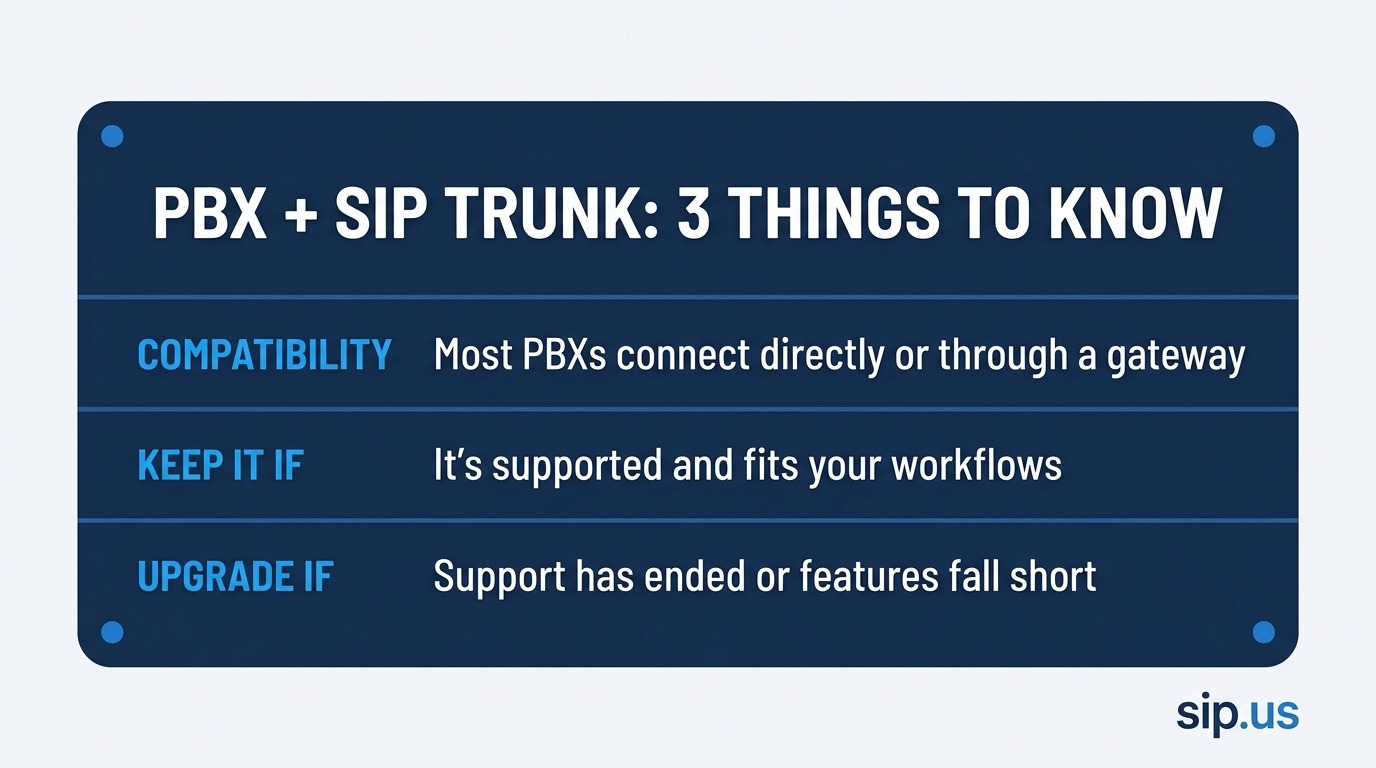
You can keep your existing PBX if it’s still supported, supports SIP or can be bridged, and still fits how your team works. SIP trunking for existing PBX equipment is usually the most cost-effective route when those conditions hold. Your system is a strong candidate if it checks most of these boxes:
- It’s still supported. The manufacturer still releases firmware and security patches, or the software is actively maintained.
- It supports SIP or can be bridged. It registers natively or connects cleanly through a gateway or ATA.
- Its features match your workflows. Auto attendants, queues, voicemail, and paging already do what your team needs.
- It has room to grow. You aren’t close to license, port, or extension limits.
If your PBX meets these criteria, replacing it to solve a connectivity problem is usually money spent in the wrong place. In most offices, the lines are what’s aging, not the switch, which is exactly the problem SIP trunking with PBX equipment solves. A well-planned SIP trunking PBX project keeps the features your staff relies on and changes only what needs changing.
What Does a PBX SIP Trunk Cost Compared to PRI Lines?
A PBX SIP trunk usually costs less than PRI because you pay only for the channels you use instead of buying capacity in fixed 23-channel circuits. Most providers charge a flat monthly rate per channel, a small monthly fee per phone number, and no per-minute charges for calls to the US48 and Canada on unlimited plans.
Savings are largest for offices paying for a full PRI while rarely running more than a handful of calls at once. Moving to eight or ten SIP channels removes that unused capacity. For a line-by-line ROI method, SIP Trunk Cost Savings walks through the math using your own bills.
What Equipment and Configuration Does a SIP Trunk for PBX Need?
A SIP-ready PBX needs no new hardware, just a business broadband connection and a properly configured firewall; older systems add a gateway or ATA, and larger networks may add a session border controller. Beyond equipment, most PBX SIP integration work happens in your network, PBX configuration, and number and 911 setup.
How Much Bandwidth Does Each Call Need?
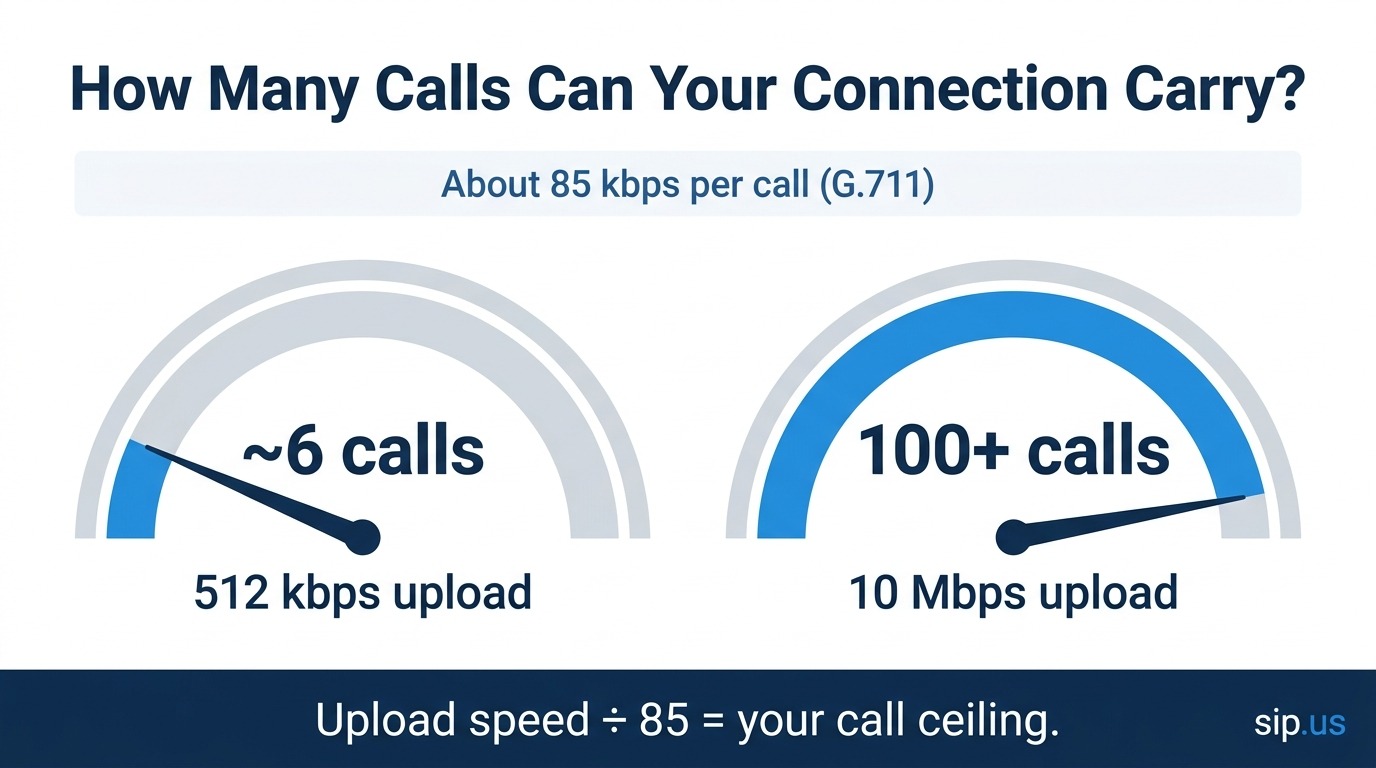
Plan for roughly 85 kbps of upload and download bandwidth per concurrent call on the G.711 codec, or less with a compressed codec like G.729. Upload speed is usually the limit, so divide your upstream bandwidth by 85 to estimate your call ceiling: a 512 kbps upstream link supports about six calls, while 10 Mbps upstream supports more than 100. Enable Quality of Service (QoS) so that voice traffic gets priority. Refer to How Many SIP Trunks to match channels to your peak concurrent calls.
Which Firewall and Security Settings Matter?
Your firewall must allow SIP signaling and the media stream that carries audio, and it should block everything else. Many Asterisk-based systems forward UDP 5060 for signaling and a UDP range such as 10000 to 20000 for media, though ports vary by platform. Choose username and password registration or IP authentication, and restrict signaling to your provider’s addresses. Multi-site networks often add a session border controller (SBC).
Every setup should also restrict outbound calling permissions and set per-trunk spending limits, since weak credentials on an internet-facing PBX are a common entry point for toll fraud. If configuration isn’t your team’s strength, ask whether the provider will help directly. One small law firm, unsure how to configure its Asterisk system, had the provider’s support team log in remotely and set up the trunk for them.
How Should You Handle Numbers, Failover, and 911?
Port your numbers last, set up failover first, and test 911 on every extension. Start the porting paperwork early, since a port can take anywhere from a few days to a few weeks. Configure failover so inbound calls route to a secondary PBX or backup number if your primary system goes offline. Federal rules implementing Kari’s Law and RAY BAUM’S Act require multi-line systems installed after February 16, 2020 to support direct 911 dialing with no “9” prefix, on-site notification, and a dispatchable location. A migration is the right moment to bring older configurations up to that standard too.
What Do Common PBX Migration Scenarios Look Like?
Most migrations fall into one of four patterns: replacing PRI circuits, bridging an analog key system, switching providers on an IP PBX, or phasing in multiple sites. Find the one closest to your setup and use it as your planning template.
1. Replacing PRI Circuits on a Digital PBX
The business enables SIP on the PBX through a license or card, or installs a SIP-to-PRI gateway. Because each PRI carries 23 voice channels, many companies find they need fewer SIP channels once they review real peak usage. Run the trunk in parallel with the PRI briefly, then port numbers and cancel the circuit.
2. Keeping an Analog Key System Running
Small offices often place a multi-port ATA in front of an analog key system, which keeps familiar lines while calls travel over SIP. Plan fax machines separately, since occasional faxing usually works through an ATA, but fax-heavy offices need a dedicated fax service. The timing matters too. On March 26, 2026, the FCC streamlined rules for retiring copper lines, making it easier for carriers to phase out the analog services these systems depend on.
3. Switching Providers on an Existing IP PBX
When your IP PBX already uses SIP, the move is mostly administrative. Add the new trunk alongside the old one, route a few numbers through it, and verify caller ID, codecs, and touch-tone behavior before porting the rest.
4. Phasing in Multiple Locations
Multi-site businesses rarely cut over everywhere at once. They migrate one site, document the working configuration, and repeat it elsewhere.
When Does Upgrading the PBX Make More Sense?
Upgrade the PBX when it’s past its end of support, costs more to maintain than to replace, or can’t deliver features your team needs. In those cases, the phone system, not the connection, is the real problem.
The clearest signal is a PBX past the end of support that no longer receives security updates, a real risk for any internet-connected system. Rising maintenance costs, hard license limits, and missing softphone, mobile, and Microsoft Teams support are others. So is a setup that needs stacked gateways, since each one adds a point of failure. In those cases, a current SIP PBX, whether on-premises, virtualized, or in a private cloud, gives your SIP trunking PBX setup a clean foundation. If you’re also weighing managed phone service against owning a PBX, the SIP Trunking vs VoIP comparison covers that broader decision.
What Belongs on a SIP Trunking With PBX Setup Checklist?
A complete checklist covers eight steps, from inventorying your PBX to decommissioning old circuits. Use it to connect SIP trunk to PBX systems with fewer surprises, work through it in order, and don’t cancel legacy lines until every item passes testing.
- Inventory your PBX. Record make, model, firmware, licenses, and ports.
- Confirm SIP support. Verify native SIP, or choose a gateway or ATA.
- Size your channels. Review peak concurrent calls from bills or call records.
- Check bandwidth and QoS. Confirm upstream capacity and prioritize voice.
- Prepare the firewall. Forward signaling and media ports, and restrict access.
- Configure the trunk and failover. Enter credentials, codecs, routes, and backup destinations.
- Configure 911. Enable direct dialing and notification, and register an address for each number.
- Test, port, and decommission. Test inbound, outbound, and fax calls, port numbers, then cancel old circuits.
A self-service control panel for trunks and numbers and flexible per-channel pricing let you start with one small test, then connect the SIP trunk to PBX sites one at a time and scale your SIP trunking with PBX setup once calls sound right.
Frequently Asked Questions
Can I use SIP trunking with my existing PBX?
In most cases, yes. SIP-enabled systems register to the trunk directly, and older digital or analog systems connect through a SIP-to-PRI gateway or an analog telephone adapter. SIP trunking for existing PBX equipment only requires replacement when the system is unsupported or can’t be bridged reliably.
Do I need a session border controller for an IP PBX SIP trunk?
Not always. Many small, single-site deployments run well with a properly configured firewall. Multi-site networks, regulated environments, and complex PBX SIP integration projects often benefit from an SBC for encryption, NAT handling, and security.
How many SIP channels does my PBX need?
You need one channel for each simultaneous call, inbound or outbound. Review your peak concurrent calls, add a small buffer, and adjust later, since channels can be added or removed without new hardware.
Will call quality match my old PRI lines?
It should, as long as your connection has enough upload bandwidth and QoS gives voice traffic priority. The default G.711 codec carries uncompressed voice, the same standard used across the traditional phone network. When problems do appear, they usually trace back to a saturated internet connection or missing QoS rather than the trunk itself.
How long does it take to connect a SIP trunk to a PBX?
The trunk itself can be provisioned within minutes, and a SIP-ready PBX can often be configured and tested in about an hour. If a provider needs to verify a new payment method, that can add up to 24 hours. Number porting is usually the longest step, so most businesses run the new trunk alongside existing lines until ports are complete.
Will my phone numbers and extensions stay the same?
Yes. Extensions, dial plans, and features live in the PBX, so they don’t change when the trunk does. Existing numbers can be ported to your new provider, and you can test the trunk before the port completes.
What happens to incoming calls if my internet goes down?
With failover configured, inbound calls can route to a secondary PBX, another site, or a backup number such as a mobile line. Setting up SIP trunk for PBX failover routes before cutover keeps callers reaching you during an outage.
Connect Your PBX to a Modern Voice Network
Your PBX doesn’t have to keep you on aging phone lines. Confirm compatibility, prepare your network, and move at a pace that fits your team. SIP.US works with IP PBX platforms and with legacy systems through gateways and adapters, backed by instant provisioning, no contracts, and a free trial with 60 minutes of calling. Start your free SIP trunk and see how it performs with your PBX today.

Mitch leads the Sales team at BCM One, overseeing revenue growth through cloud voice services across brands like SIPTRUNK, SIP.US, and Flowroute. With a focus on partner enablement and customer success, he helps businesses identify the right communication solutions within BCM One’s extensive portfolio. Mitch brings years of experience in channel sales and cloud-based telecom to every conversation.
Free SIP Trunk in 60 Seconds
Related Posts

PRI vs SIP Trunking: Differences, Costs & Migration Considerations
PRI vs SIP comes down to fixed circuit capacity versus flexible internet-based channels, and for…

What Is a DID Number? Direct Inward Dialing Explained
Unlock the potential of your communication system with our Beginner’s Guide to DID Numbers and SIP Trunks, offering cost-effective, scalable solutions for modern businesses and individuals.
What Is SIP? A Complete Guide to Session Initiation Protocol
Discover everything about SIP and how it revolutionizes communication. Learn what is SIP, its benefits, and how to implement it in your business for better connectivity.