

What Is Router Quality of Service (QoS) and Why Should You Care?
Clear business calls depend on more than your internet speed; they depend on how your router prioritizes voice traffic over competing data.
- Router quality of service assigns priority levels to different types of network traffic, ensuring voice packets reach their destination without interruption.
- Without proper QoS configuration, large file downloads and video streaming can cause choppy audio, dropped calls, and frustrated customers.
- Modern VoIP routers with QoS features cost less than $100 and can dramatically improve call reliability for small businesses.
Invest 15 minutes in QoS setup today, and your team will notice the difference on every call tomorrow.
Data traveling over your internet connection constantly competes for attention. Voice calls, video streams, file downloads, and cloud applications all share the same bandwidth, fighting for priority. When a large file download consumes available bandwidth, your important client call suffers with garbled audio and awkward pauses. Router quality of service solves this problem by establishing rules that determine which traffic moves first.
SIP trunking transforms business communications by routing voice calls over internet connections rather than traditional phone lines. This technology delivers cost savings and flexibility, but it also means voice quality depends entirely on network performance. VoIP traffic is time-sensitive and vulnerable to network congestion when routers switch to a first-in, first-out approach.QoS technology ensures voice packets receive preferential treatment, maintaining call clarity even during peak network usage.
How Does Router Quality of Service Work?
The best metaphor is to view your internet connection as a highway where many different types of vehicles travel simultaneously. Casual web browsing resembles Sunday drivers with no particular urgency. Large data transfers act like long-haul truckers carrying heavy loads. Video conferencing and VoIP calls function like commuters who need to arrive on time. Emergency communications represent ambulances that require immediate passage. All this traffic moves in the same direction through limited lanes, and without management, gridlock occurs.
Router quality of service acts as a traffic management system that assigns priority levels to different data types. When configured properly, QoS identifies voice packets and moves them to the front of the queue, bypassing less urgent traffic. This prioritization happens automatically, thousands of times per second, ensuring real-time communications flow smoothly regardless of what else your network handles. The router examines each data packet, identifies its type through various markers, and places it in the appropriate queue for transmission.
Most modern routers include QoS capabilities, though the sophistication varies between models. Basic routers offer simple device-based prioritization, while business-grade equipment provides granular control over traffic types, bandwidth allocation, and queueing strategies. The intelligence behind each vendor’s QoS functionality depends on the quality of algorithms used and the processing power available to execute them.
What Happens When QoS Isn’t Enabled?
Without QoS configuration, routers process data packets in the order they arrive, treating all traffic equally regardless of urgency. This approach works when network utilization remains low, but problems emerge quickly during busy periods. When someone downloads a large video file while you conduct a sales call, the voice packets get stuck behind massive data transfers. The result includes choppy audio, words cutting out, and potentially dropped calls during critical conversations.
Consider a typical scenario: your marketing team uploads a presentation to the cloud while your sales representative closes a deal over the phone. Without QoS, both activities compete equally for bandwidth. The upload consumes available capacity, leaving voice packets waiting in queue. By the time those packets reach their destination, the delay creates noticeable lag. Your sales representative asks a question and waits uncomfortably for the response, damaging the professional impression your business works hard to maintain.
Why Is VoIP QoS Critical for Business Calls?
Voice communication operates under different constraints than typical data transfers. When you download a file, brief delays cause minimal problems because the complete file eventually arrives intact. Voice conversations require real-time interaction where delays of even 150 milliseconds create awkward pauses and cross-talk. Small businesses that rely on SIP trunk quality and reliability can’t afford degraded call quality during customer interactions.
Modern business operations demand consistent communication performance regardless of network conditions. Your team might conduct video conferences while accessing cloud applications, transferring files, and running bandwidth-intensive analytics. Each activity consumes network resources that could affect call quality without proper traffic management. VoIP QoS establishes boundaries that protect voice communications from interference.

What Are the Key Metrics That Affect Call Quality?
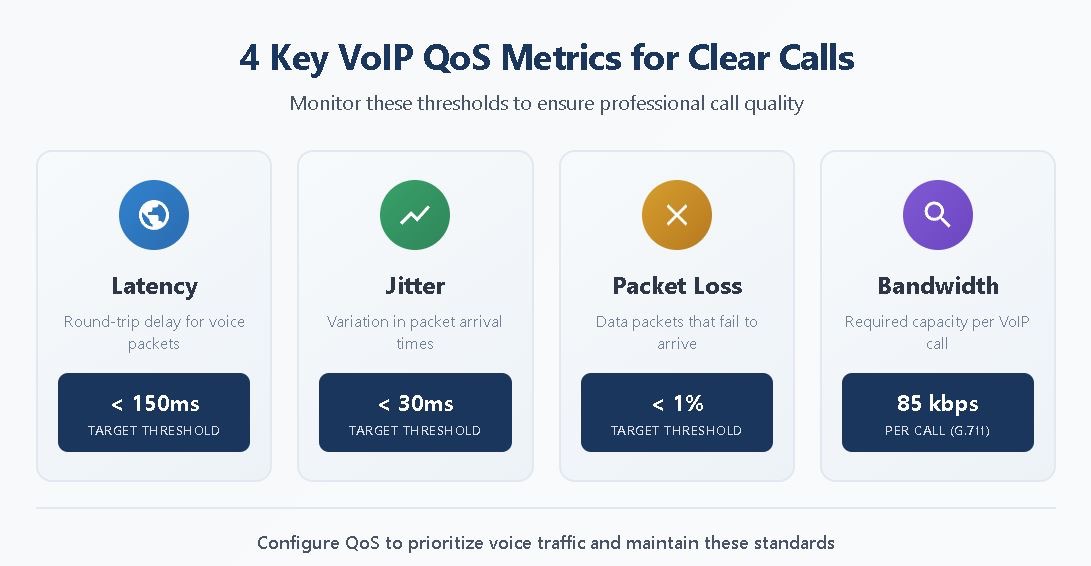
Understanding network performance metrics helps identify problems and verify that QoS configurations work correctly. Four primary measurements determine whether voice communications meet professional standards:
Latency measures the time required for voice packets to travel from speaker to listener. Industry standards recommend keeping one-way latency below 150 milliseconds for acceptable call quality. Higher latency creates noticeable delays that disrupt natural conversation flow, making participants talk over each other or wait awkwardly between exchanges.
Jitter represents variation in packet arrival times. Even when average latency meets acceptable thresholds, inconsistent delivery causes audio distortion. Voice systems use buffers to smooth minor variations, but excessive jitter overwhelms these compensations. Networks should maintain jitter below 30 milliseconds to ensure clear audio reproduction.
Packet loss occurs when data packets fail to reach their destination. Unlike file transfers, where lost packets can be retransmitted, voice communications happen in real time. Lost voice packets cannot be recovered, resulting in gaps, clicks, or robotic-sounding audio. Professional voice quality requires packet loss rates below one percent.
Bandwidth determines how many simultaneous calls your connection supports. Each VoIP call using the G.711 codec requires approximately 85 kilobits per second of bandwidth in each direction. A connection with 10 megabits upstream capacity theoretically supports over 100 simultaneous calls, though practical limits exist based on network overhead and other traffic.
How Do You Set Up Router QoS for SIP Trunking?
Configuring router QoS for SIP trunking involves several steps that establish proper traffic identification and prioritization. While specific procedures vary between router manufacturers, the fundamental approach remains consistent across platforms. Business owners comfortable with basic network administration can typically complete QoS setup within an hour, while more complex environments may require professional assistance.
What Are DSCP Values, and Why Do They Matter?
Differentiated Services Code Point (DSCP) values provide a standardized method for marking network packets according to their priority requirements. To prioritize voice traffic, network administrators mark Real-time Transport Protocol and Session Initiation Protocol packets with DSCP 46, which signals the network to treat tagged packets as top priority.This marking system enables consistent handling across multiple network devices, ensuring priority assignments persist throughout the transmission path.
VoIP devices typically mark their own traffic with appropriate DSCP values automatically. However, your router must be configured to recognize and honor these markings for prioritization to work effectively. Some firewalls and security devices strip DSCP tags unless specifically configured to preserve them, potentially negating careful QoS planning. Verifying end-to-end DSCP handling ensures voice traffic receives intended priority treatment across your entire network infrastructure.
Step-by-Step QoS Setup Process
Begin by accessing your router’s administration interface, typically through a web browser pointed at the router’s IP address. Locate the QoS or Traffic Management section within the configuration menus. Router manufacturers place these settings in different locations, so consulting your documentation may prove necessary.
Enable QoS functionality if it appears disabled by default. Some routers require explicit activation before priority settings take effect. Once enabled, you will typically see options for configuring upstream bandwidth limits. Setting this value slightly below your actual upload speed, approximately 90% of measured capacity, helps ensure QoS has room to operate effectively.
Configure traffic prioritization by identifying voice traffic for highest priority treatment. You can accomplish this through several methods: prioritizing specific devices by MAC address, prioritizing specific ports used by SIP traffic (typically UDP 5060 for signaling and a range of ports for media), or prioritizing traffic marked with DSCP 46. The most reliable approach combines device-based and DSCP-based prioritization for comprehensive coverage.
Test your configuration by conducting calls while generating competing network traffic. Download large files or stream video during test calls to verify that voice quality remains acceptable under load. If problems persist, review your settings and consider SIP trunk troubleshooting resources for additional guidance.
What Is the Best Router for VoIP in 2026?
Selecting the right router impacts VoIP performance and simplifies QoS configuration. Modern routers designed for business communications include sophisticated QoS capabilities that require minimal technical expertise to configure. When choosing a VoIP router, careful consideration of features like QoS for call prioritization, security protocols to prevent VoIP-specific threats, and built-in support for failover ensures reliable communications. The following options are excellent choices for small businesses prioritizing voice quality:
TP-Link ER605 delivers enterprise features at small business prices. This wired router supports VLAN configuration, up to 20 VPN connections, and comprehensive QoS controls. Cloud management capabilities enable remote configuration and monitoring. For businesses prioritizing wired connections, this router provides exceptional value.
Ubiquiti UniFi Dream Machine Pro combines routing, firewall, and security gateway functions in one device. Centralized network control through the UniFi Controller simplifies traffic prioritization, firewall management, and threat protection. Redundant WAN ports support failover and load balancing, while VLAN support enables voice traffic segmentation.
ASUS RT-AX88U Pro supports dual VoIP-optimized protocols, including H.323 and SIP. Enhanced NAT passthrough reduces VoIP latency and jitter, while adaptive QoS enables customized traffic prioritization. Wi-Fi 6 support provides excellent wireless performance for offices with mobile devices.
Netgear Nighthawk X10 provides tri-band wireless connectivity with speeds reaching 7,000 Mbps. The Quad Stream feature enables four data streams for each Wi-Fi band, ensuring excellent connectivity across large office spaces. Built-in Plex media server capabilities add value for businesses requiring media streaming alongside voice communications.
SonicWall TZ270 emphasizes security alongside VoIP performance. Deep packet inspection, intrusion prevention, and content filtering protect communications from threats. Built-in bandwidth management and granular QoS ensure voice traffic receives appropriate priority while maintaining robust network security.
What Should You Look for in a QoS-Enabled Router?
Beyond brand and model considerations, certain features distinguish routers well-suited for VoIP environments from basic consumer equipment. Understanding these requirements helps ensure your investment delivers reliable voice communications for years to come.
QoS configuration options should include both device-based and traffic-type-based prioritization. Routers limiting QoS to basic device priority may not adequately protect voice traffic when multiple devices generate calls. Look for DSCP support that enables proper handling of marked voice packets across your network.
VLAN support enables logical separation of voice and data traffic on the same physical network. This segmentation prevents data traffic from interfering with voice communications even during extreme bandwidth utilization. Professional VoIP deployments commonly use VLANs to ensure consistent call quality.
Processing power determines how effectively routers handle QoS functions under heavy load. Underpowered routers may struggle to maintain proper prioritization when processing high traffic volumes, defeating the purpose of QoS configuration. Business-grade routers include sufficient processing capability to handle realistic workloads.
The ability to disable SIP ALG (Application Layer Gateway) matters for VoIP compatibility. Many routers include SIP ALG features intended to help VoIP traverse NAT boundaries, but these functions frequently cause more problems than they solve. Routers allowing SIP ALG disablement provide greater flexibility for advanced SIP trunking configurations.
Frequently Asked Questions
How much bandwidth does each VoIP call require? Each VoIP call using the G.711 codec requires approximately 85 kilobits per second of bandwidth in both upstream and downstream directions. Compressed codecs like G.729 use less bandwidth but may slightly reduce audio quality. Calculate your total bandwidth needs by multiplying the maximum number of simultaneous calls by the bandwidth per call, then ensure your internet connection provides adequate capacity with headroom for other network activities.
Will QoS work if my internet service provider doesn’t support it? QoS configured on your router primarily affects traffic leaving your local network, giving priority to voice packets before they reach your ISP. While your provider’s network operates independently, proper local QoS prevents your own network activities from interfering with voice quality. The most significant improvements come from managing traffic within your control, though some business internet services offer enhanced QoS treatment for voice traffic.
Should I use wired or wireless connections for VoIP phones? Wired Ethernet connections provide the most consistent performance for VoIP devices because they eliminate wireless interference and bandwidth competition. If wireless connections are necessary, ensure your access points support WMM (Wi-Fi Multimedia) and configure them to prioritize voice traffic. Wi-Fi 6 networks with proper QoS configuration can support reliable VoIP, but wired connections remain the gold standard for mission-critical voice communications.
How do I know if my QoS settings are working correctly? Test QoS effectiveness by conducting voice calls while deliberately generating competing network traffic. Download large files or stream video during calls and listen for audio degradation. If call quality remains stable despite heavy network utilization, your QoS configuration works properly. Network monitoring tools can also verify that voice packets receive priority treatment and measure latency, jitter, and packet loss during actual calls.
Make Clear Calls Your Business Standard
Router quality of service transforms unreliable voice communications into consistently professional experiences. The technology requires minimal investment and moderate technical effort while delivering immediate, noticeable improvements in call quality. Small businesses competing against larger organizations benefit tremendously from communication systems that project competence and professionalism during every customer interaction.
Understanding how QoS works empowers informed decisions about network infrastructure and equipment selection. The best router for VoIP combines adequate processing power, comprehensive QoS options, and reliable security features at a price point that’s right for small business budgets. Taking time to configure QoS properly ensures voice traffic receives the priority treatment it requires for clear, uninterrupted conversations.
SIP.US delivers enterprise-grade voice quality through Tier-1 redundant networks designed for reliability. Combined with properly configured QoS on your local network, SIP trunking provides the foundation for professional business communications at a fraction of traditional phone system costs. Get started with SIP.US today and experience the clarity your business communications deserve.

Mitch leads the Sales team at BCM One, overseeing revenue growth through cloud voice services across brands like SIPTRUNK, SIP.US, and Flowroute. With a focus on partner enablement and customer success, he helps businesses identify the right communication solutions within BCM One’s extensive portfolio. Mitch brings years of experience in channel sales and cloud-based telecom to every conversation.
Free SIP Trunk in 60 Seconds
Related Posts

What Is a DID Number? Direct Inward Dialing Explained
Unlock the potential of your communication system with our Beginner’s Guide to DID Numbers and SIP Trunks, offering cost-effective, scalable solutions for modern businesses and individuals.

What Is SIP? A Complete Guide to Session Initiation Protocol
Discover everything about SIP and how it revolutionizes communication. Learn what is SIP, its benefits, and how to implement it in your business for better connectivity.

What Is Internet Protocol? IP Definition and How It Works
Internet protocol is the addressing and routing system that gets every business call, email, and…