
SIP Trunking with PBX Systems: How It Works, Compatibility & Migration
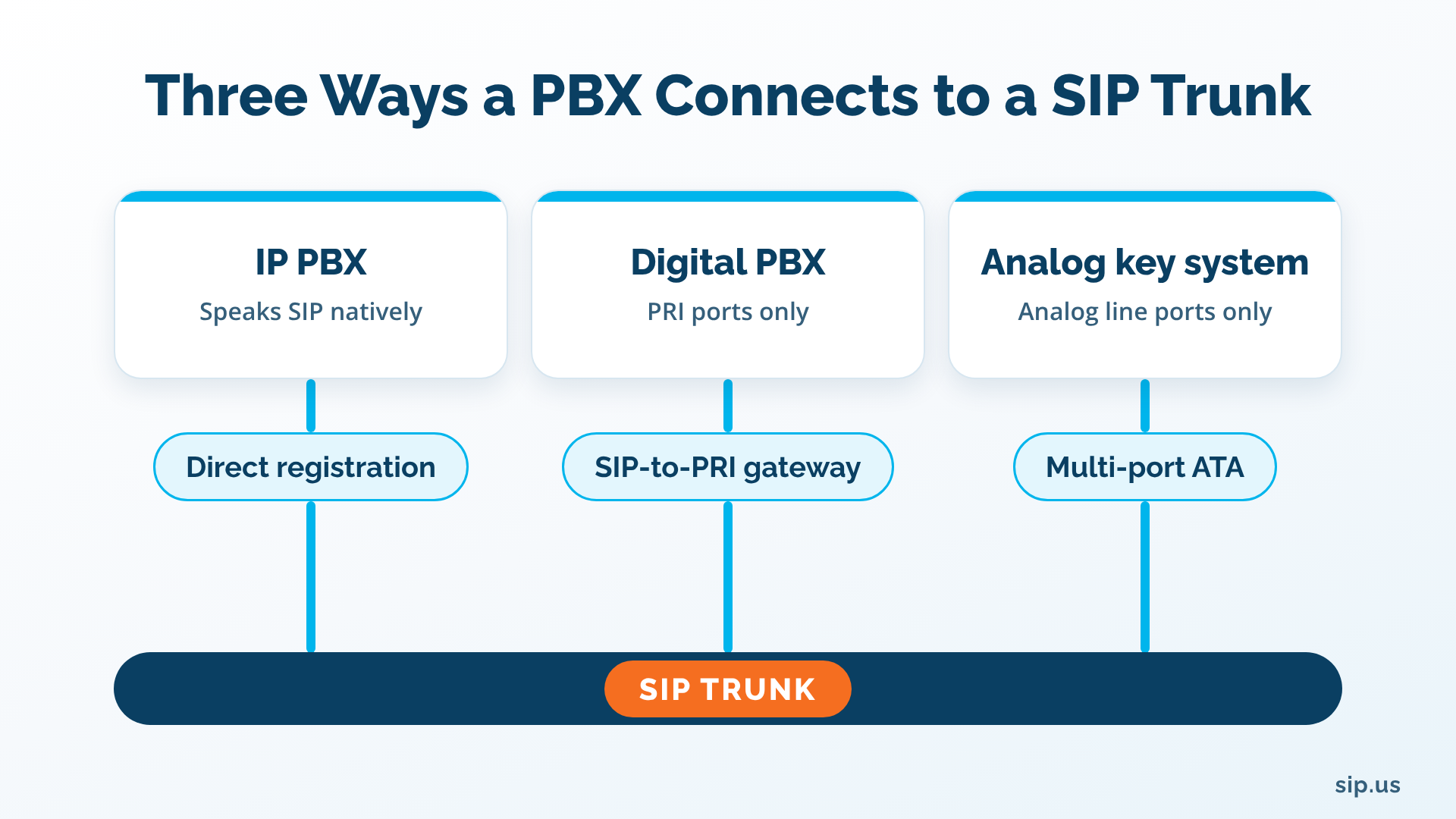
Most PBX systems can connect to a SIP trunk, and the right integration path depends on whether your PBX speaks SIP natively.
- An IP PBX registers to a PBX SIP trunk directly, with no new hardware beyond a properly configured firewall.
- Digital PBXs with PRI cards connect through a SIP-to-PRI gateway, and analog key systems connect through a multi-port adapter.
- Most integration work happens in a handful of PBX settings: authentication, codecs, routes, firewall ports, failover, and 911.
- Replacing the PBX makes sense only when it’s out of support or can’t be bridged cleanly.
Before you price a new phone system, confirm what your current PBX supports. Changing the connection is usually faster and cheaper than changing the switch.
SIP trunking with PBX systems lets you keep the phone system your team already uses and replace only the lines behind it. Your PBX keeps handling extensions and call routing, while the SIP trunk carries calls to and from the public telephone network over your internet connection.
That pairing is still how most businesses modernize voice. On-premises deployments held about 75% of SIP trunking market share in 2025, according to Mordor Intelligence’s SIP trunking research, largely because companies want to extend the life of PBX equipment they’ve already paid for. If you’re planning SIP trunking for an existing PBX, the first job is confirming what your current system can connect to.
How Does SIP Trunking with PBX Systems Work?
A SIP trunk replaces the PBX’s outside lines, not the PBX itself. The PBX still decides where every call goes inside the company, and the trunk carries calls to and from your provider’s network as SIP sessions over IP.
Where Does the Trunk Connect to the PBX?
The trunk plugs in where your PRI card or analog outside lines connect today. On an IP PBX, you create a SIP trunk that points at the provider’s server and authenticates with a username and password or a static IP address. The Definitive Guide to SIP Trunking for Businesses covers channels and call flow in more depth.
What Changes for Your Users?
Very little changes for users. Extensions, dial plans, hunt groups, voicemail, and auto attendants all live in the PBX, so staff keep the same phones and habits. Inbound calls now arrive as SIP sessions mapped to your direct inward dial (DID) numbers, and outbound calls leave through a route that points at the trunk.
Is Your PBX Compatible with a SIP Trunk?
Almost any PBX can work with a SIP trunk. IP PBX platforms connect directly, hybrid systems often need a license or firmware update, and older digital or analog systems connect through a gateway or adapter. The table shows where each type of system lands.
| PBX Type | Speaks SIP? | How It Connects | Typical Extra Equipment |
| IP PBX (software, virtual, or appliance) | Yes | Registers to the trunk directly | None beyond firewall configuration |
| Hybrid digital PBX | Often, after an update | Native SIP once enabled | SIP trunk license, firmware, or IP card |
| Digital PBX with PRI or T1 ports only | No | SIP-to-PRI gateway | Digital VoIP gateway |
| Analog PBX or key system | No | Analog telephone adapter | Multi-port ATA |
How Can You Check Your PBX in Five Minutes?
Start at the back of the unit. An Ethernet or data port is a good sign the system can handle IP trunking, while a cabinet with only analog outside-line ports usually can’t. Next, look in the admin interface or manual for a section on configuring a SIP trunk. Still unsure? Send the make, model, and software version to your provider, since those three facts decide every other step of SIP trunking with PBX equipment.
How Do Traditional and IP PBX Systems Differ?
An IP PBX already speaks SIP, so integration is mostly a matter of settings, while a traditional system usually needs added hardware or a license first. Asterisk-based platforms, 3CX, Yeastar, and current releases from Avaya, Cisco, Mitel, and NEC support SIP trunks natively, and a single-site SIP PBX can often be connected and tested the same day. On traditional systems, some vendors also license SIP sessions individually, so confirm licensing before you size channels. Also confirm the vendor still issues firmware for your model, since an unpatched PBX facing the internet is a security risk on any trunk.
Which Gateways and Adapters Bridge Older PBX Systems?
A SIP-to-PRI gateway bridges digital PBXs, and a multi-port analog telephone adapter bridges analog PBXs and key systems. Both sit between the trunk and the PBX, so the PBX sees the circuit it always has while calls travel as SIP. Multi-site networks may also add a session border controller (SBC) at the edge to secure and normalize SIP traffic, though a single office with a well-configured firewall usually doesn’t need one.
When Do You Need a SIP-to-PRI Gateway?
You need a SIP-to-PRI gateway when your PBX has PRI ports but can’t run SIP natively. The gateway presents the trunk to your PBX as a T1 PRI, so the existing PRI card and dial plan keep working. You enter trunk credentials on the gateway’s IP side and match PRI settings such as switch type, framing, and line coding on the PBX side. It’s the cleanest way to retire a PRI circuit without reprogramming the PBX.
When Do You Need an Analog Telephone Adapter?
Analog-only systems need a multi-port ATA. Use one when your PBX or key system has analog line ports and nothing else. The adapter turns SIP into analog lines that a key system or small analog PBX treats as ordinary outside lines. Each FXS port plugs into one of the PBX’s line ports and carries one call at a time, and units commonly come with 4, 8, or 24 ports. Analog Telephone Adapter: How to Choose an ATA for SIP covers port types and selection. For businesses running older equipment, this overview of SIP trunking for legacy PBX systems covers the common setups.
What Configuration Does a PBX SIP Trunk Need?
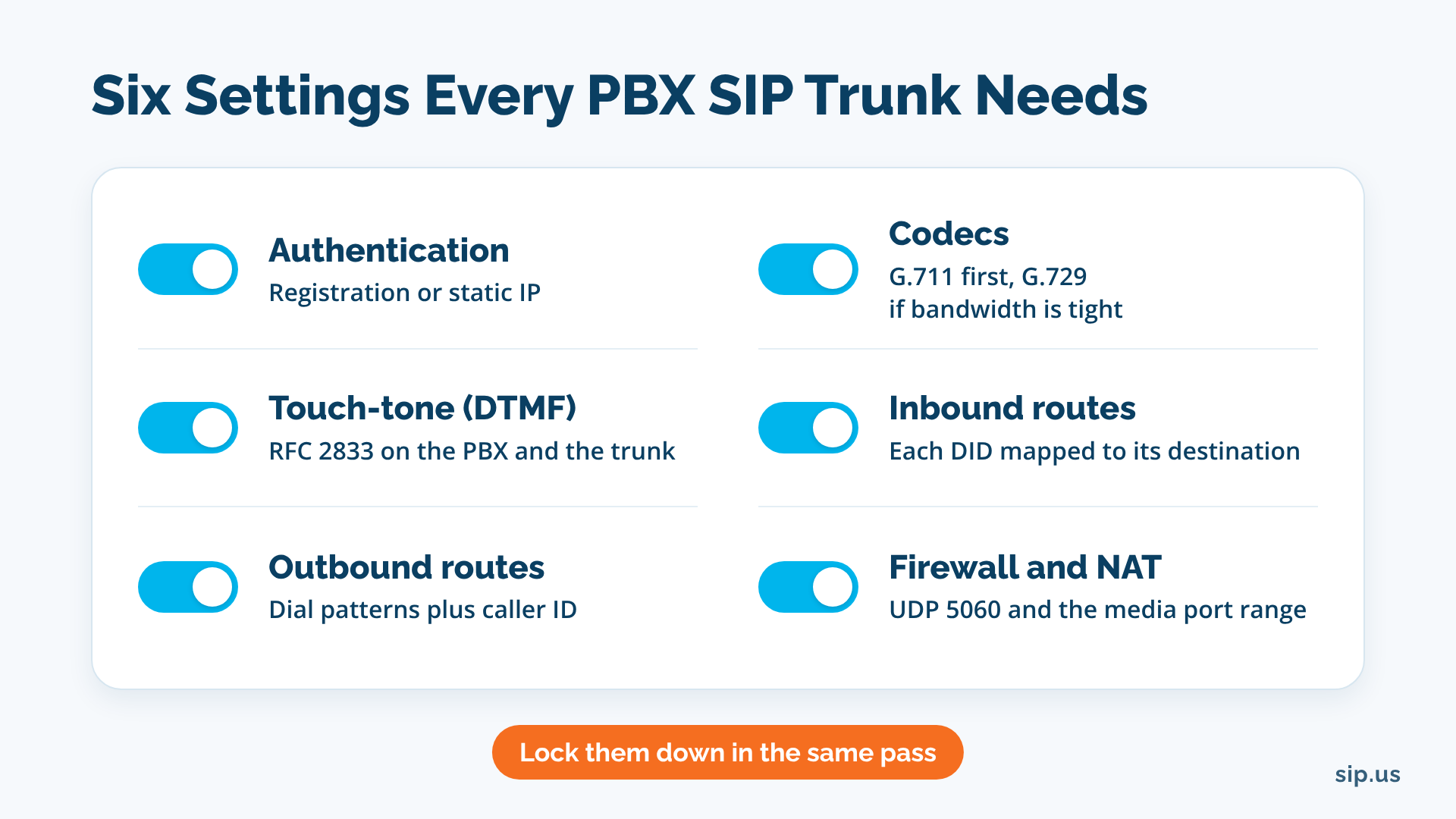
A PBX SIP trunk needs six core settings: authentication, codecs, touch-tone handling, inbound routes, outbound routes, and firewall rules. Most PBX SIP integration work happens here rather than in hardware.
| Setting | What to Configure | Why It Matters |
| Authentication | Username and password registration, or IP authentication from a static address | Lets the provider recognize your PBX |
| Codecs | G.711 first, G.729 when bandwidth is tight | Mismatched codecs cause calls to fail |
| Touch-tone (DTMF) | RFC 2833 events on both the PBX and the trunk | Keeps auto attendant and voicemail menus responsive |
| Inbound routes | Each DID mapped to an extension, queue, or attendant | Decides where outside callers land |
| Outbound routes | Dial patterns that use the trunk, plus caller ID per number | Controls which calls use the trunk and what recipients see |
| Firewall and NAT | Signaling port (often UDP 5060) and media range (often UDP 10000 to 20000) | Prevents one-way audio and failed registrations |
Lock those settings down in the same pass. Restrict signaling to your provider’s addresses, use long and unique credentials, and limit which extensions can dial high-cost destinations, since an internet-facing PBX with weak passwords is a common target for toll fraud.
How Much Bandwidth Does Each Call Need?
Plan for about 85 kbps of upload and download per concurrent call on G.711, which matches published SIP trunk bandwidth guidance, and less on the compressed G.729 codec. Upload speed usually sets the ceiling, so divide your upstream bandwidth by 85 kbps to estimate call capacity, then leave headroom for everything else on the network. Turn on Quality of Service (QoS) at the router so voice packets go ahead of large downloads.
How Should You Set Up Failover and 911?
Set failover before cutover so inbound calls still land if the PBX or internet connection drops, routing each number to a primary PBX, then a backup site or mobile number. Emergency calling needs equal care. Multi-line systems installed after February 16, 2020 must support direct 911 dialing with no prefix, notify someone on site when the system can, and convey a dispatchable location, and the FCC’s guidance for multi-line telephone systems makes clear those duties reach the businesses that manage and operate the system. On a SIP trunk for PBX systems, that means registering a validated address for every number that can call 911 and testing it before go-live.
What Happens to Your Existing Hardware?
Most of it stays. Desk phones and paging connect to the PBX, so they keep working after SIP trunking with PBX equipment goes live. The devices that need a plan are the ones wired to an outside line directly: fax machines, alarm panels, elevator phones, postage meters, and card terminals. Occasional faxing can work through an ATA with T.38 enabled, but fax-heavy offices are better served by a fax-to-email service. Alarm and elevator lines need a code-compliant path, so check with the monitoring company before you move them. Inventory these lines before you schedule cutover, since they’re the ones that tend to surprise teams on the day.
What Do Common PBX Migration Scenarios Look Like?
Most SIP trunking with PBX migrations follow one of four patterns. Find the one closest to your setup and use it as your planning template.
1. Retiring PRI Circuits on a Digital PBX
Enable SIP on the PBX or add a SIP-to-PRI gateway. Because a PRI bills for 23 channels whether you use them or not, many companies need fewer SIP channels once they check real peak usage. An office whose call records never show more than nine simultaneous calls, for example, can start with ten SIP channels instead of paying for 23. Run the trunk in parallel, move a few test numbers, then port the rest and cancel the circuit. PRI vs SIP Trunking: Differences, Costs & Migration Considerations compares the two technologies in detail.
2. Keeping an Analog Key System in Service
Small offices often place a multi-port ATA in front of an analog key system and keep the phones staff already know. The timing matters more than it used to. When the FCC eased its copper retirement rules on March 26, 2026, Broadband Breakfast reported that one of the largest carriers already had approval to stop selling new service at 85% of its more than 5,000 wire centers. If your carrier is retiring copper in your area, plan the ATA move before the discontinuance notice arrives.
3. Switching Providers on an Existing IP PBX
When your IP PBX already uses SIP, PBX SIP integration with a new provider is mostly administrative. Add the new trunk alongside the old one and send a few test numbers through it. Check caller ID and touch-tone menus first. Keep the old trunk active until every port completes, so no number is ever without a working path.
4. Phasing in Multiple Locations
Multi-site businesses rarely cut over everywhere at once. Migrate one site first and write down the trunk and firewall settings that worked. Then repeat that template at each location. Each SIP PBX can share a trunk with other sites or keep its own for separate call records and failover.
When Should You Keep Your PBX Instead of Replacing It?
Keep your PBX when it’s supported, connects cleanly, and still fits how your team works. In that case, SIP trunking with PBX equipment you already own fixes the real problem, the aging lines, without a hardware project. Your system is a strong candidate if most of these are true:
- It’s still supported. The manufacturer or community still releases firmware and security patches.
- It connects cleanly. It registers natively or works through one gateway or ATA.
- Its features fit your workflows. The auto attendant and call queues already do what staff need.
- Capacity isn’t maxed out. You aren’t near your license or extension limits.
When Is It Time to Replace the PBX?
Replace the PBX when it’s past end of support and no longer gets security updates, when maintenance costs more each year than a new system would, or when it can’t deliver the softphone, mobile, or Microsoft Teams calling your team expects. Stacked gateways are another warning sign. Each added box is one more point of failure. A current IP PBX then gives your SIP trunking PBX setup a clean foundation. If you’re weighing a hosted platform against owning a PBX, SIP vs VoIP: A Complete Comparison for Businesses covers that broader decision.
What Belongs on a SIP Trunking with PBX Checklist?
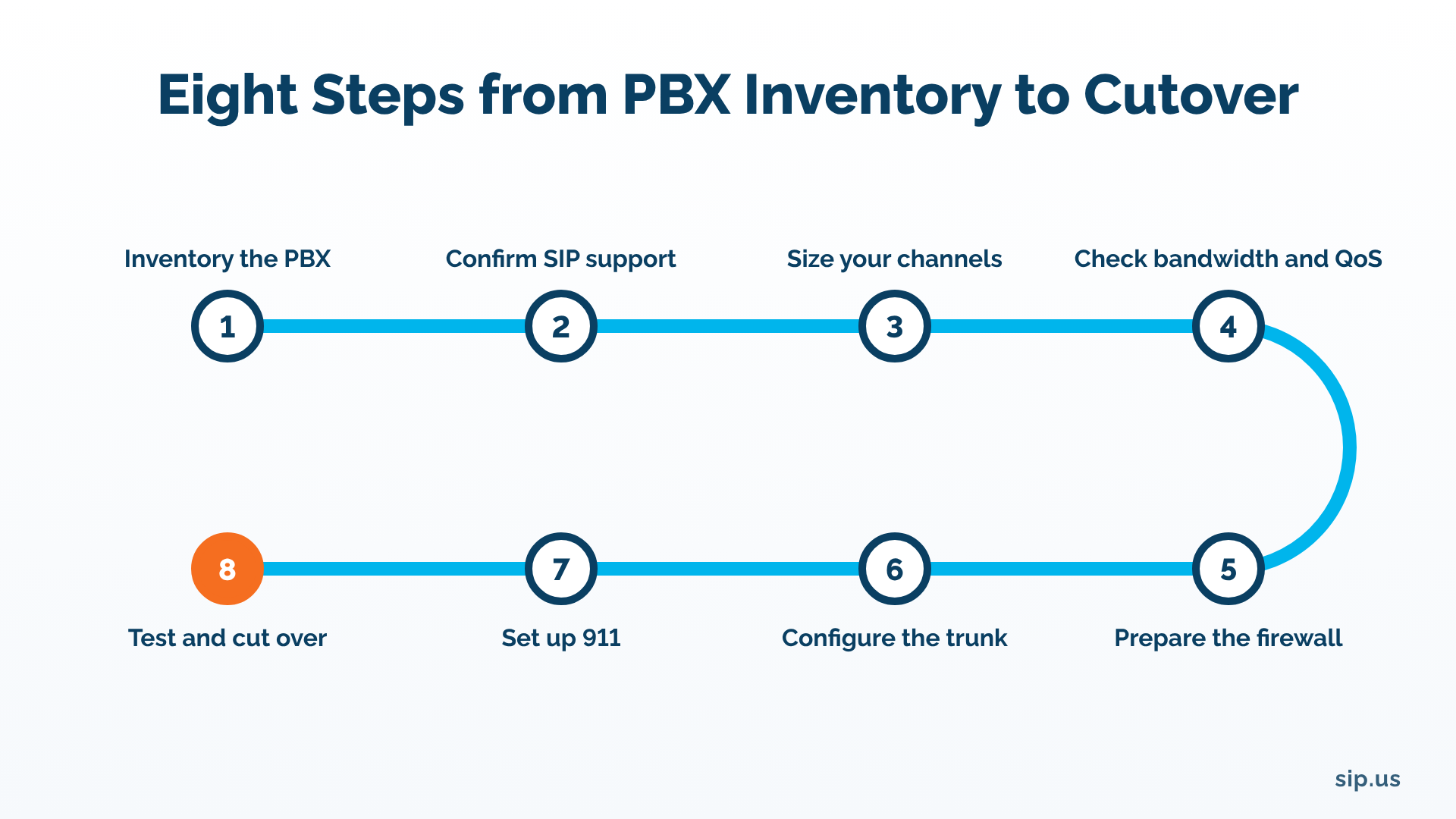
It starts with a PBX inventory and ends with decommissioning the old circuits, so work through it in order before any SIP trunking PBX cutover. Don’t cancel legacy lines until every item passes testing.
- Inventory the PBX. Record make, model, software version, licenses, and trunk ports.
- Confirm SIP support. Verify native SIP, or choose a SIP-to-PRI gateway or multi-port ATA.
- Size your channels. Pull peak concurrent calls from call records or carrier bills.
- Check bandwidth and QoS. Confirm upstream capacity and prioritize voice at the router.
- Prepare the firewall. Open signaling and media ports, and restrict them to your provider.
- Configure the trunk. Enter credentials, codecs, DTMF, inbound and outbound routes, and failover.
- Set up 911. Enable direct dialing and on-site notification, and register an address for every number.
- Test and cut over. Place test calls in both directions, including fax, then port numbers and cancel old circuits.
Frequently Asked Questions
These short answers cover what IT and office managers usually ask before connecting a trunk to an existing phone system.
Can I Use SIP Trunking with My Existing PBX?
Yes, in most cases. SIP trunking with PBX systems works directly with SIP-enabled systems and with older digital or analog systems through a gateway or adapter. Replacement is only necessary when the PBX is unsupported or can’t be bridged reliably.
How Many SIP Channels Does My PBX Need?
You need one channel for each simultaneous call, inbound or outbound. When sizing a SIP trunk for PBX traffic, check peak concurrent calls in your PBX’s call records or recent carrier bills, then add a small buffer. You can add or drop channels later.
Will My Phone Numbers and Extensions Stay the Same?
Yes. Extensions and dial plans live in the PBX, so they don’t change when the trunk does. Existing numbers can be ported to the new provider, and you can test the trunk with temporary numbers before the port completes.
How Long Does It Take to Connect a SIP Trunk to a PBX?
The trunk itself can usually be provisioned within minutes, and a SIP-ready PBX can often be configured and tested in about an hour. Gateway installs add time for cabling and matching PRI or analog settings. Number porting is usually the longest step, so most businesses run the new trunk alongside existing lines until every port is complete.
Connect Your PBX to a Modern Voice Network
Your PBX doesn’t have to keep you tied to aging lines. Start by confirming what your system supports, then move one circuit or one site at a time. SIP.US works with IP PBX platforms and with legacy systems through gateways and adapters, backed by one self-service control panel, instant number provisioning, nomadic E911, and no contract required. Start your free trial and test your PBX with 60 minutes of calling today.
Start your free trial
Related Posts
SIP Technology in Telecom: How the SIP Protocol Works
The SIP protocol is the signaling layer that sets up, changes and ends every call…

SIP Trunks for Small Business: The Complete Buyer’s Guide
Small businesses get the most from SIP trunking when they buy capacity by concurrent calls,…

PRI vs SIP Trunking: Differences, Costs & Migration Considerations
PRI vs SIP comes down to fixed circuit capacity versus flexible internet-based channels, and for…