

SIP Trunks for Small Business: The Complete Buyer’s Guide
Small businesses are replacing phone lines with SIP channels because the pricing, scaling model, and regulatory timeline all now point in the same direction.
- The cost structure is fundamentally different. Traditional service bills you per line whether you use it or not, while SIP trunking bills you per concurrent call, and that single change accounts for savings of roughly 25% to 65% over legacy PRI circuits.
- The migration timeline is no longer yours to set. Federal regulators have cleared away the procedural steps that used to slow copper retirement, which means the decision window for many businesses is measured in months rather than years.
- Your existing phone system probably already works. Most PBX equipment sold in the last decade is SIP-capable out of the box, and legacy analog systems connect through an inexpensive adapter.
- Channel sizing, not headcount, drives your bill. A 25-person company rarely needs 25 channels, and understanding that distinction is where most of the savings live.
Audit what you already own before you shop because the right answer depends far more on your current equipment and call patterns than on any provider’s feature list.
The United States is home to 36.2 million small businesses, which together account for close to half of all private sector employment. Most of them still run their voice service on infrastructure designed for a different era of work, and the bill reflects it. SIP trunks for small business operations solve that problem by replacing physical phone lines with virtual channels that ride your existing internet connection, and the technology has matured to the point where deployment takes minutes rather than weeks. This guide covers what SIP trunking is, what it costs, how to migrate without disrupting service, and how to evaluate providers against the criteria that actually matter for a company with fewer than 100 employees.
What Are SIP Trunks for Small Business, and How Do They Work?
Session Initiation Protocol is the signaling standard that sets up, manages, and ends real-time communication sessions across an IP network. A SIP trunk is the virtual connection that carries those sessions between your phone system and the public switched telephone network, replacing the copper or T1 circuits that used to perform the same job. SIP trunking sits within the broader family of voice over IP technology, which covers any method of carrying calls over a data connection.
How Does a SIP Trunk Connect to Your Phone System?
Your private branch exchange, or PBX, is the system that manages extensions, call routing, auto attendants, and voicemail. In a traditional setup, that PBX connects to the outside world through physical lines leased from a carrier. With SIP trunking, the PBX instead connects to your data network, and voice traffic travels over the same broadband circuit that carries your email and file transfers. The PBX keeps doing exactly what it always did. Only the transport layer changes, which is why PBX and SIP are complementary rather than competitive.
What Is the Difference Between SIP Trunking and Hosted VoIP?
The honest answer is that it depends on what you already own. It helps to be clear on the difference between SIP and VoIP first, since the two terms get used interchangeably in sales conversations. Hosted VoIP is a fully managed platform where the provider runs the phone system on your behalf and bills you per user, per month. SIP trunking supplies connectivity to a phone system you control and bills you per simultaneous call channel.
If you already have a functional PBX, SIP trunking preserves that investment. If you have no phone system at all and no technical staff, a hosted platform removes a layer of responsibility. The full hosted VoIP versus SIP trunking comparison walks through the decision factors in more detail.
How Many Channels Does a Small Business Actually Need?
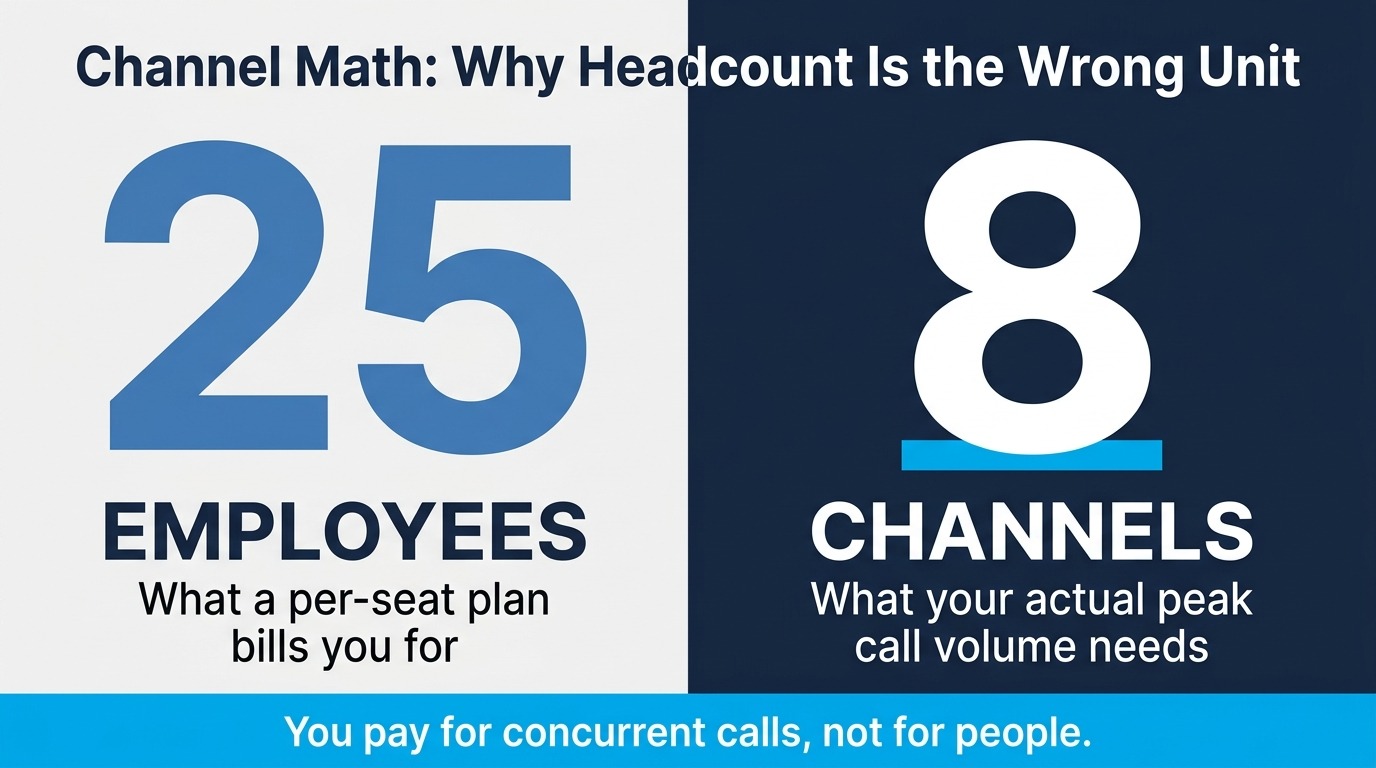
Channels correspond to concurrent calls, not to employees, and this detail makes SIP trunking for small business budgets so much more efficient than fixed circuits. If your team of 30 never has more than eight people on the phone at the same moment, you need eight channels plus a small buffer. A common starting point is one channel for every three to four employees, adjusted for how phone-heavy your operation is. A dental practice with two front-desk staff answering calls all day has a very different profile than a 40-person engineering firm where most communication happens over email. Call detail records from your current provider will tell you your actual peak, and that number is almost always lower than what owners expect.
Why Are Small Businesses Replacing Traditional Business Phone Systems?
Three forces are converging, and none of them is marketing-driven. Regulation, economics, and workforce distribution have each independently made legacy circuits harder to justify.
What Does Copper Retirement Mean for Your Timeline?
The FCC has spent the last two years systematically removing the procedural friction that used to slow the retirement of copper networks. Its March 2026 modernization order eliminated filing requirements in the commission’s network change disclosure rules and streamlined the process for discontinuing legacy services. Practically, this means carriers can move faster, and the notice you receive may be your first indication that a change is coming. Businesses still running voice, fax, or alarm circuits over copper should be inventorying those lines now rather than waiting. Planning a migration on your own schedule is considerably less disruptive than executing one on a carrier’s.
How Does the Cost Structure Change?
Legacy circuits are sold in fixed blocks. A Primary Rate Interface line delivers 23 voice channels, and you pay for all 23 whether your peak call volume is 20 or four. SIP trunking removes that granularity problem by letting you buy the exact capacity you use and adjust it from a web portal. Independent SIP trunking market research identifies cost savings between 25% and 65% over legacy PRI lines as the single strongest driver of adoption, and the same analysis shows the small and medium business segment growing faster than the enterprise segment. A closer look at where SIP trunking savings come from breaks down each contributing line item.
Why Do Distributed Teams Change the Calculation?
Work patterns have settled into a shape that legacy phone systems were never designed for. Gallup’s research on hybrid work shows that 52% of remote-capable U.S. employees now work hybrid and another 26% are fully remote, with just 22% fully on-site. Those figures have held stable since 2022. A phone system anchored to a desk in a single office fits only that last group. SIP trunking decouples the phone number from the building, so an employee’s extension follows them to a home office, a client site, or a mobile device without any change to how customers reach them.

What Do SIP Trunks for Small Business Actually Cost?
Pricing for SIP trunking works differently enough from hosted platforms that direct comparison requires translating between two units of measurement. Getting that translation right is where most budgeting mistakes happen.
How Does Per-Channel Pricing Work?
You pay a recurring monthly rate for each concurrent call channel, plus a small monthly charge for each phone number, or DID, in your account. Most providers don’t charge for the trunk itself, only for the channels inside it. Because channels are pooled across your whole organization, a company with 25 employees and a peak of eight simultaneous calls pays for eight channels rather than 25 seats. That math is the reason SIP trunking tends to win on cost for teams where phone usage is concentrated among a subset of staff.
What Else Belongs in Your Budget?
Beyond channels and numbers, a realistic budget accounts for a few predictable items. Number porting fees are usually one-time and modest, and many providers waive them at volume. Enhanced DIDs that support address registration for 911 carry a small additional monthly charge. If your PBX is not SIP-capable, an analog telephone adapter or gateway is a one-time hardware purchase. Finally, if your internet circuit lacks headroom, budget for bandwidth. Each concurrent call on the standard G.711 codec consumes roughly 85 kbps in each direction, so 10 simultaneous calls need under one megabit of dedicated capacity.
Where Do the Savings Come From?
Savings accumulate from four places. You stop paying for unused channel capacity in fixed blocks. Long distance across the contiguous states typically folds into the channel rate rather than metering separately. You eliminate the maintenance contracts and truck rolls associated with physical circuits. And you avoid the hardware replacement cycle, since scaling happens in software. Businesses evaluating this shift often find that cost-effective communication solutions pay for themselves inside the first year.
How Do You Migrate to a SIP-Based Small Business Phone System?
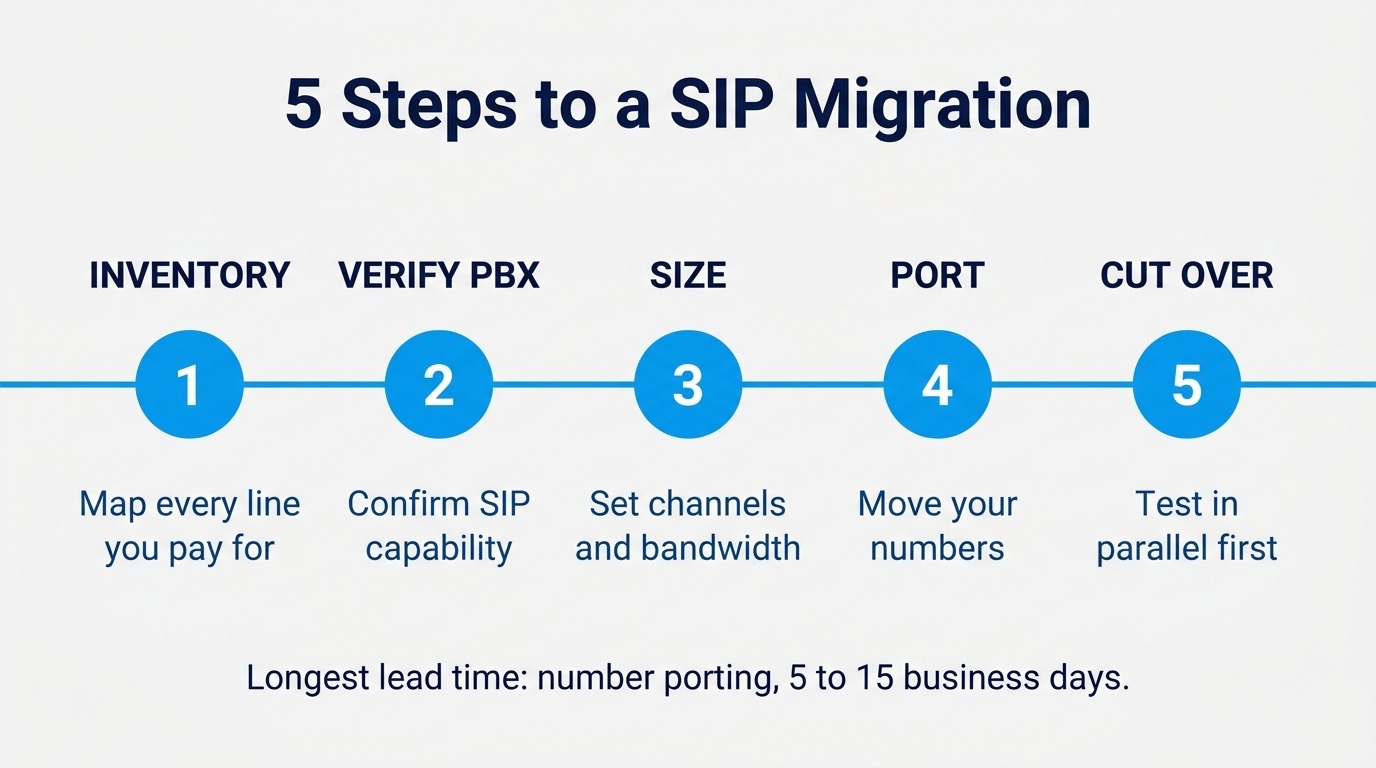
Migration is far less disruptive than most owners anticipate, largely because the old and new systems can run in parallel during the transition. The sequence below reflects how successful cutovers typically unfold.
Step 1: Inventory Every Line You Currently Pay For
Pull your last three carrier invoices and map every circuit to what it actually connects. Voice lines, fax lines, alarm panels, elevator phones, and credit card terminals all tend to appear on the same bill, and each has different replacement requirements. Life-safety circuits carry code obligations that a generic voice service may not satisfy, so flag those separately and address them first.
Step 2: Confirm Whether Your PBX Speaks SIP
Most systems sold in the last decade do. A quick physical check helps. If the back of the unit has an Ethernet jack, it is likely SIP-capable. If it only has analog line ports, an adapter will bridge the gap, and multi-port adapters are available in four, eight, and 24-port configurations. Your system manual will typically have a section on configuring a SIP trunk, often near the specifications at the back. Reviewing which PBX platforms handle SIP well is worthwhile if you are also considering a system upgrade.
Step 3: Size Your Channels and Verify Bandwidth
Use your existing call detail records to find your true concurrent peak, then add 20–30% of headroom. Confirm that your internet connection can carry that peak alongside normal data traffic, and enable quality of service on your router so voice packets receive priority. Without QoS, a large file download can degrade call audio at exactly the wrong moment.
Step 4: Port Your Numbers
Number portability lets you keep your existing phone numbers, and the process usually takes between 5 and 15 business days, depending on your current carrier and number type. Toll-free numbers generally move faster than local numbers. Submit porting paperwork early because this step has the longest lead time, and it’s the one you can’t compress.
Step 5: Test in Parallel, Then Cut Over
Configure the trunk, route a test number to it, and place calls in both directions before touching your production numbers. Verify inbound routing, outbound caller ID, 911 address registration, and failover behavior. Only after all four check out should you complete the port and retire the old circuits.
What Should You Look for When Comparing Business VoIP Providers?
Not every provider serves the small business segment equally well, and the differences that matter are rarely the ones featured on pricing pages. Because business phone systems tend to stay in place for years, the evaluation deserves more scrutiny than a monthly rate comparison. If you’re still assembling a shortlist, a survey of SIP providers for small businesses is a reasonable place to begin. When comparing business VoIP providers and SIP trunking services, weigh these 10 factors:
- Contract terms. Month-to-month service with no early termination penalty protects you if your needs change or the service disappoints. Long contracts transfer risk from the provider to you.
- Self-service provisioning. The ability to add a channel, buy a number, or change routing yourself if necessary is worth more than it sounds. Waiting on a support ticket to add capacity during a busy season is a real operational cost.
- Network redundancy. Look for Tier-1 upstream carriers and geographically separated gateways. Redundant SIP proxies in different regions mean a regional outage doesn’t take your phones down.
- Failover routing. Good service lets you designate a secondary trunk and a backup PSTN number per DID, so calls reach you even if your primary system or internet connection fails.
- Toll fraud protection. Compromised trunks can quickly generate enormous charges. Providers that disable international dialing by default, monitor for abnormal patterns, and terminate suspicious calls in progress protect you from a category of loss that’s hard to recover from.
- DID inventory depth. A provider with numbers in thousands of rate centers can give you a local presence in the markets you serve. Thin inventory means settling for a number that doesn’t match your service area.
- E911 handling. Nomadic 911 support that lets you register a valid street address per number and update it as people move is essential for distributed teams and increasingly a compliance matter.
- Real-time call detail records. Visibility into usage in near real time lets you right-size channels and spot problems early. Exportable records matter for cost allocation and troubleshooting.
- Platform compatibility. Confirm support for your specific PBX and any unified communications platform you use. Direct routing into a collaboration platform is a common requirement.
- Trial availability. A free trial with real calling minutes lets you validate audio quality on your actual network before committing. Any provider confident in their service will offer one.
A detailed look at features that separate SIP providers can help you build a scoring sheet from this list.
How Are Small Businesses Using SIP Trunking?
Generic benefit lists obscure how this technology serves different operations. The patterns below come up repeatedly, and they illustrate why SIP trunking for small business buyers rarely looks the same from one industry to the next.
Professional Services Firms
Law offices, accounting practices, and consultancies tend to have high per-call value and low call volume. Their priority is reliability and professional presentation rather than raw capacity. A small channel count paired with call recording, direct-dial numbers for each attorney or partner, and clean failover to mobile covers nearly every requirement. The ability to add a channel during tax season or a trial period and remove it afterward maps neatly onto how these businesses actually operate.
Multi-Location Retail and Restaurants
Operations with several locations benefit most from consolidation. Rather than maintaining separate carrier accounts and separate bills per site, a single trunk with numbers assigned to each location centralizes management and billing. Calls can route between locations without touching the outside network, and a single after-hours message can cover every site.
Healthcare and Dental Practices
Practices face concentrated call peaks at opening and after lunch, when patients call to schedule, reschedule, or ask about results. Channel-based pricing efficiently handles those peaks because capacity is sized to the busiest moment rather than to the number of staff who occasionally answer a phone. Integration with practice management software through the PBX layer lets front-desk staff see patient context on inbound calls. Accurate 911 address registration is also a standing requirement for any location where patients are physically present.
Field Service and Contracting Businesses
Plumbing, HVAC, electrical, and landscaping companies rely on answered calls, and their staff is almost never at a desk. Routing a main number to a mobile app, then failing over to a secondary technician, means fewer missed opportunities. Business texting on the same numbers customers already call has become a meaningful differentiator for appointment confirmation.
Nonprofits and Member Organizations
Budget constraints and volunteer-heavy staffing make month-to-month terms and self-service management especially valuable. Staff turnover is high enough that any system requiring specialist knowledge to administer becomes a liability. These organizations also run donation or membership campaigns that create short, intense call spikes. The ability to triple channel capacity for a few weeks and then scale back is difficult to replicate with fixed circuits.
What Mistakes Do Small Businesses Make With SIP Trunking?
A handful of avoidable errors account for most of the disappointing migrations. Each is easy to prevent with a small amount of planning:
- Undersizing bandwidth or skipping QoS. Voice quality problems are almost always network problems rather than provider problems. Verify capacity and enable traffic prioritization before blaming the trunk.
- Buying channels based on headcount. Paying for a channel per employee eliminates the primary financial advantage of the model. Size to concurrent calls instead.
- Leaving international dialing enabled by default. Toll fraud targets small businesses because they’re less likely to be monitoring. Keep international calling off unless you need it.
- Porting before testing. Once numbers move, rollback is slow. Validate everything on a test number first.
- Forgetting the non-voice lines. Fax, alarm, and elevator circuits need their own replacement plan, and they’re frequently discovered only after the voice migration is complete.
Businesses weighing the broader architecture question may also want to review how hosted and on-premise systems compare before finalizing a direction.
Frequently Asked Questions About SIP Trunks for Small Business
Can I keep my existing phone system when I switch to SIP trunking?
In most cases, yes. Any SIP-enabled PBX connects directly, and that includes the large majority of systems sold in the past decade. Legacy analog systems and key systems connect through an analog telephone adapter, which converts SIP to analog and sits in front of the existing equipment. Replacing a functional phone system is rarely necessary.
How long does it take to get SIP trunking up and running?
Provisioning itself is typically immediate, and trunk configuration on a supported PBX often takes under an hour. The variable is number porting, which usually runs 5 to 15 business days. Businesses that start with new numbers can make calls the same day, then port existing numbers on a separate timeline.
How much bandwidth do I need for SIP trunking?
Each concurrent call on the standard G.711 codec uses approximately 85 kbps upstream and downstream. Ten simultaneous calls therefore require roughly 850 kbps in each direction, dedicated to voice and separate from your data usage. Compressed codecs reduce that further when bandwidth is constrained. Quality of service configuration on your router matters as much as raw capacity.
Is SIP trunking reliable enough for a business that cannot afford downtime?
Reliability depends on architecture rather than on the protocol. Providers using Tier-1 upstream carriers with geographically separated gateways, redundant proxies, and per-number failover to a backup trunk or PSTN number deliver availability that meets or exceeds legacy circuits. Configure failover before you need it, not after.
Do SIP trunks support business texting and faxing?
Texting is widely supported, and SMS on your existing business numbers has become a standard expectation for appointment reminders and customer confirmations. Faxing requires more care because traditional fax modems are sensitive to jitter and latency. Light fax users often succeed with an adapter, while businesses where fax is critical should use a dedicated fax service that transmits over traditional circuits rather than over IP.
What is the difference between SIP and VoIP?
VoIP is the broad category of transmitting voice over an internet connection. SIP is the specific signaling protocol that establishes and manages those sessions, and it handles video and messaging as well as voice. The two are complementary rather than competing, so the distinction matters most when you are comparing service models rather than comparing technologies.
Which providers serve small businesses best?
The providers that serve this segment well share a profile: transparent per-channel pricing, no contracts, instant provisioning, self-service control, and a free trial. Enterprise-focused carriers often bundle SIP with managed services that small teams neither need nor want to pay for. Match a provider’s typical customer size against your own before you start comparing feature lists.
Start Building a Phone System That Scales With You
The businesses that handle this transition well share one habit: they audit before they shop. Once you know how many concurrent calls you actually place, what equipment you already own, and which non-voice circuits need attention, the provider decision becomes straightforward. Everything else is negotiable, but that foundational inventory is not.
SIP.US delivers the profile a modern small business phone system calls for, with transparent per-channel pricing, no contracts, instant provisioning, and a self-service control panel that puts numbers, trunks, routing, and call records under your direct control. Start your free trial and get 60 minutes of calling to test the service on your own network before you commit to anything.

Mitch leads the Sales team at BCM One, overseeing revenue growth through cloud voice services across brands like SIPTRUNK, SIP.US, and Flowroute. With a focus on partner enablement and customer success, he helps businesses identify the right communication solutions within BCM One’s extensive portfolio. Mitch brings years of experience in channel sales and cloud-based telecom to every conversation.
Free SIP Trunk in 60 Seconds
Related Posts

What Is a DID Number? Direct Inward Dialing Explained
Unlock the potential of your communication system with our Beginner’s Guide to DID Numbers and SIP Trunks, offering cost-effective, scalable solutions for modern businesses and individuals.

What Is SIP? A Complete Guide to Session Initiation Protocol
Discover everything about SIP and how it revolutionizes communication. Learn what is SIP, its benefits, and how to implement it in your business for better connectivity.

What Is Internet Protocol? IP Definition and How It Works
Internet protocol is the addressing and routing system that gets every business call, email, and…