
SIP Gateway Explained: How It Works, Business Use Cases, and Setup
A SIP gateway converts signals from legacy phone hardware into the digital packets that travel over your internet connection, letting you modernize voice communications without ripping out your existing equipment.
- A SIP gateway bridges traditional analog or digital PBX systems and modern VoIP networks, translating signals so old hardware can connect to SIP trunks.
- Hardware gateways serve on-premise legacy PBXs, while software gateways run on cloud-based or virtualized phone systems.
- Common business use cases include extending legacy investments, enabling Microsoft Teams calling on existing phones, and supporting hybrid VoIP transitions.
- Configuration requires firewall rules, authentication, and the right voice codecs, plus careful security practices to prevent toll fraud.
If your business still relies on legacy phones but needs the flexibility of VoIP, a SIP gateway is the most cost-effective bridge you can deploy.
A SIP gateway is a hardware device or software application that converts traditional telephony signals into the Session Initiation Protocol (SIP) format used by modern voice over IP systems. It sits between your existing private branch exchange (PBX) and your internet connection, translating between two languages: the analog or digital signals of legacy phone equipment and the digital data packets of IP-based voice. With the right VoIP technology and provider pairing, you can keep the phones you already own while moving voice traffic to the cloud.
The business case for a SIP trunk gateway is strong. According to Fortune Business Insights research, the SIP trunking segment held the largest market share within the broader VoIP market, with hosted IP PBX projected to dominate at a 37.33% share in 2026, driven by lower initial costs and easier integration. Organizations are migrating voice to IP, and gateways are how the older hardware comes along for the ride.
How Does a SIP Gateway Bridge Two Generations of Phone Systems?
The core function of a SIP gateway is signal translation. Traditional PBX systems use either analog signals over copper lines or digital signals over PRI (Primary Rate Interface) circuits, while modern VoIP systems use SIP to manage call sessions over the internet. The gateway sits in the middle and converts one to the other in real time.
This translation preserves your existing investment. If your business spent thousands on a digital PBX five years ago, you don’t have to throw it out to gain VoIP features. The gateway lets you adopt new capabilities like cloud-based call routing, business SMS, and unified communications while continuing to use the desk phones, conference units, and PRI-based PBX you already paid for.
How Does a SIP Gateway Work?
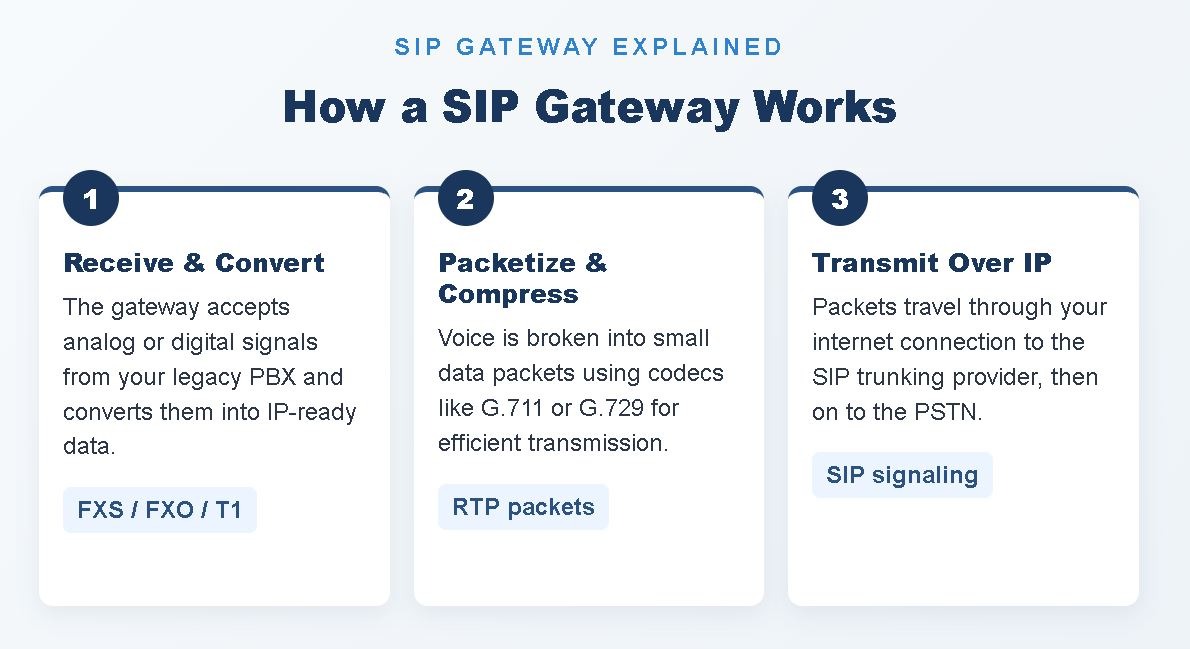
With the SIP gateway explained at a high level, it helps to look under the hood. The mechanics of a SIP gateway involve four stages: signal reception, conversion, packetization, and transmission. Each stage happens in milliseconds, which is why call quality through a properly configured gateway is indistinguishable from a native VoIP call.
Signal Reception and Conversion
When a user picks up a phone connected to your legacy PBX and dials a number, the call leaves the PBX as either an analog electrical signal or a digital T1/PRI stream. That signal travels over copper or fiber to the gateway, where the device’s digital signal processor (DSP) interprets it. Hardware gateways typically include FXS ports (for connecting analog phones) and FXO ports (for connecting to traditional phone lines), while higher-capacity units support full T1 or E1 interfaces. The DSP then converts the audio waveform into a digital format compatible with SIP.
Packetization and Codec Compression
Once the signal is digital, the gateway breaks the audio stream into small data packets. This is where voice codecs come in. The G.711 codec produces high-quality audio at roughly 85 kbps per call, while G.729 compresses the audio to about 8 kbps when bandwidth is limited. The gateway tags each packet with timing and sequence information so the receiving system can reassemble the conversation in order.
Transmission Over IP
The packets travel over your internet connection using the Real-Time Transport Protocol (RTP) for the audio itself and SIP for the call signaling, which handles setup, ringing, answering, and termination. The packets reach your VoIP SIP gateway provider, which routes the call to the public switched telephone network (PSTN) or to another VoIP endpoint. If the receiving party is on a legacy system, another gateway on their end converts the packets back into analog or digital signals.
What Are the Main Types of SIP Gateways?
SIP gateways are not one-size-fits-all. The right type depends on what you’re connecting to, how much call volume you handle, and whether your phone system is on-premise or cloud-based.
Analog (FXS/FXO) Gateways
Analog gateways connect traditional analog phones, fax machines, or older PBXs to a SIP network. FXS ports power and signal to analog phones, while FXO ports connect to existing analog phone lines. These gateways typically come in 2-port, 4-port, 8-port, and 24-port configurations, making them suitable for small offices, branch locations, or hybrid environments where you want to keep a few analog devices like fax machines or door intercoms.
Digital (T1/E1/PRI) Gateways
Digital gateways handle higher-capacity connections. A single T1 PRI circuit carries 23 voice channels, so a digital gateway becomes the practical choice when you’re connecting a mid-sized to large PBX that uses PRI lines. These devices convert the PRI stream into SIP and are commonly deployed in call centers, hotels, and larger enterprise offices.
Software (Virtual) Gateways
Software gateways run as applications on standard servers or cloud infrastructure. Instead of dedicated hardware, they use the host machine’s CPU to perform signal conversion. Software gateways suit businesses that have already moved to a software-based PBX (like Asterisk, FreePBX, or 3CX) and want to extend it with SIP trunking. They scale more easily than hardware, since adding capacity is a matter of provisioning more compute rather than buying another box.
What Is the Difference Between a SIP Gateway and a PBX?
SIP gateway vs PBX sound similar but do entirely different jobs, and you typically need both.
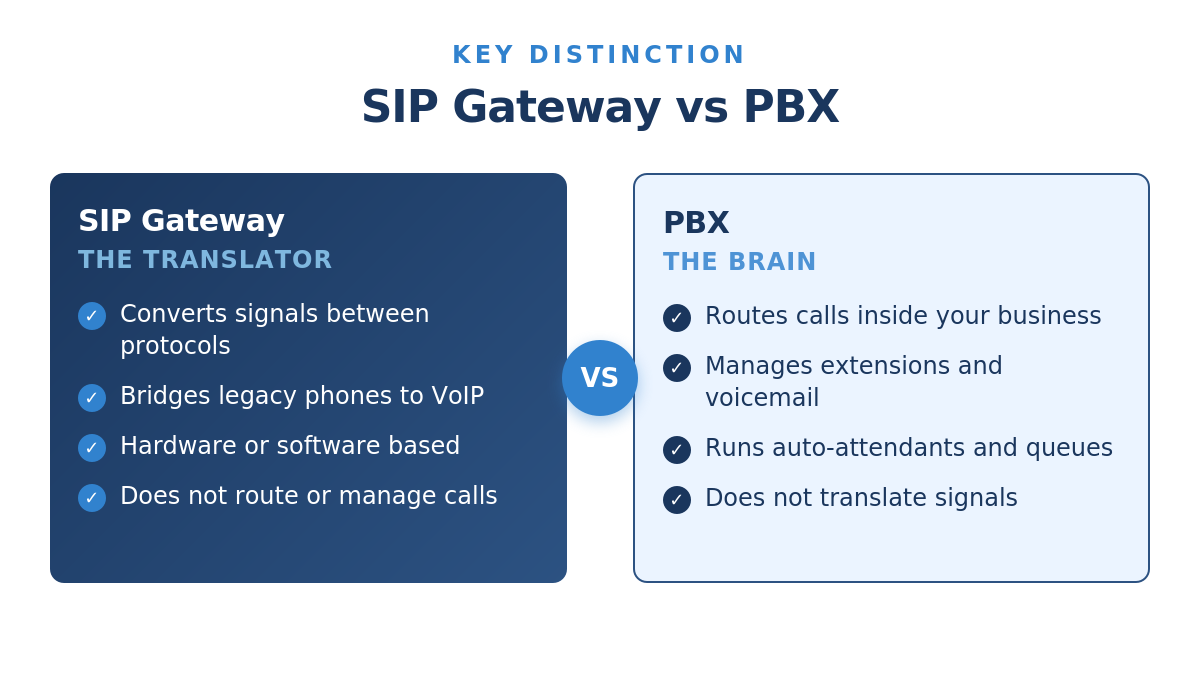
A PBX is the brain of your phone system. It manages internal call routing, extensions, voicemail, auto-attendants, and call queues. Whether it lives on-premise or in the cloud, the PBX decides where calls go inside your organization. A SIP gateway, by contrast, is a translator. It doesn’t route calls or manage features. Its only job is to convert signals between protocols so two incompatible systems can communicate.
In a typical deployment, calls originate at desk phones, flow through the PBX (which applies routing logic), pass through the SIP gateway (which converts the signal to SIP), and then travel over your internet connection to the SIP trunking provider. The provider hands the call off to the PSTN or routes it to another VoIP endpoint. Understanding the SIP gateway vs PBX relationship is fundamental: without the gateway, a legacy PBX can’t speak SIP, and without the PBX, you have no internal call management.
What Are the Top Business Use Cases for a SIP Gateway?
A SIP trunk gateway solves real, specific problems for businesses at different stages of communications modernization. Here are the most common scenarios where a gateway delivers measurable value:
- Extending the life of a legacy PBX. If your existing PBX still works and is fully depreciated, a gateway lets you adopt SIP trunking without replacing the hardware. You drop your monthly telecom costs while keeping the phones, wiring, and routing logic you already trust.
- Hybrid transitions to the cloud. Many organizations migrate to cloud communications in phases. A gateway lets one location run on the legacy system while another uses cloud SIP, with both connected to the same SIP trunking provider.
- Connecting analog devices that don’t speak SIP. Fax machines, paging systems, alarm dialers, and elevator phones often use analog signaling. A small FXS gateway brings these devices onto the IP network without replacing them.
- Microsoft Teams calling on existing desk phones. The Microsoft Teams SIP Gateway feature lets compatible SIP phones from vendors like Poly, Yealink, and AudioCodes sign in to Teams with corporate credentials, preserving hardware investments during a Teams rollout.
- Multi-site consolidation. A regional business with mixed PBX systems across offices can use gateways at each site to standardize on a single SIP trunking provider, simplifying billing and management.
For organizations weighing the full economics of these transitions, this breakdown of SIP trunking pricing is a useful next read.
How Do You Set Up a SIP Gateway?
Setting up a SIP gateway involves three categories of work: physical or virtual installation, network configuration, and integration with your VoIP SIP gateway provider. The exact steps vary by device, but the framework is consistent.
Physical or Virtual Installation
For a hardware gateway, install the device in your network rack and connect it to your PBX through the appropriate ports (FXS, FXO, T1, or E1). Connect the gateway’s WAN port to your network so it can reach your SIP trunking provider. For a software gateway, install the application on a server with the right specifications, ensuring you have enough CPU and bandwidth headroom for peak call volume.
Network and Firewall Configuration
Your firewall must permit the SIP signaling traffic, which usually runs on UDP port 5060, and the RTP media traffic, which uses a range of UDP ports (commonly 10000 to 20000). You’ll also want to enable Quality of Service (QoS) on your router to prioritize voice traffic over data downloads, which prevents call quality degradation when the network is busy. Many routers ship with SIP ALG enabled, which can interfere with SIP signaling and cause one-way audio or dropped calls. In most cases, disabling SIP ALG produces better results.
Provider Integration
Log in to your provider’s control panel, create a new trunk, and configure the authentication method. Reputable providers support both username/password authentication and IP-based authentication for added security. Enter the credentials on your gateway, point the gateway at the provider’s SIP proxy servers, and place a test call. If you’re configuring 3CX, FreePBX, or another popular PBX platform, look for provider-specific setup guides that walk through the exact configuration screens. This SIP Trunking benefits guide covers the broader fundamentals if you’re new to provisioning trunks.
How Do You Secure a SIP Gateway?
A SIP gateway sits at the edge of your network, exposed to internet traffic. That makes it a potential target for toll fraud and unauthorized access. Strong security practices prevent the most common attacks.
Use strong, unique passwords for all SIP authentication credentials, and rotate them when staff with access leaves. Enable IP-based authentication when possible, which restricts trunk access to your specific public IP address. Encrypt SIP signaling with TLS and media with SRTP to protect against eavesdropping and call interception. Configure international call blocking on any trunk that doesn’t need to dial outside North America, and set per-trunk spending limits so a compromised system can’t rack up thousands of dollars in fraudulent calls before you notice. Finally, work with a provider that monitors for fraud patterns in real time and automatically terminates suspicious calls.
For organizations looking to understand how voice security fits into broader VoIP infrastructure, this overview of voice over IP services covers the underlying technology in depth.
Make the Switch With Confidence
A SIP gateway is the practical, low-risk way to bring legacy phone hardware into the VoIP era. It preserves the investment you’ve already made in your PBX and phones while unlocking the cost savings, scalability, and feature set of modern SIP trunking. When you pair the right gateway with the right VoIP SIP gateway provider, you get reliable call quality, predictable pricing, and a clear path to a fully cloud-based future when you’re ready.
SIP.US makes that pairing simple. Our service works with virtually any SIP-capable PBX and connects easily to analog and digital gateways from major manufacturers. Channels are billed at a flat monthly rate with no contracts, setup fees, or surprises. Get started today with a free SIP trunk in 60 seconds and find out how much easier modernizing your business communications can be.
Frequently Asked Questions
What is the difference between a SIP gateway and a SIP trunk?
A SIP trunk is the virtual phone line that carries calls between your phone system and your service provider over the internet. A SIP gateway is the hardware or software device that converts your legacy phone signals into the SIP format the trunk requires. You need both: the trunk provides the connection, and the gateway makes your legacy equipment compatible with it.
Do I need a SIP gateway if I already have a VoIP-ready PBX?
No. If your PBX is already SIP-enabled, it can connect directly to a SIP trunking provider without a separate gateway. SIP gateways are specifically for bridging older, non-SIP equipment to a modern VoIP network. Most PBX systems sold in the last several years support SIP natively.
Can a SIP gateway work with Microsoft Teams?
Yes. Microsoft offers a Teams SIP Gateway service that lets compatible SIP phones sign in to Teams using corporate credentials. Organizations can preserve their existing SIP phone hardware during a Teams Phone deployment instead of replacing every desk phone.
How much does a SIP gateway cost?
Gateway hardware costs vary based on capacity and port type, with small analog units sitting at the low end and high-capacity digital PRI gateways at the higher end. Software gateways are typically licensed per channel. The ongoing operating cost is your SIP trunking service, which is generally billed as a flat monthly rate per channel.
Will a SIP gateway affect my call quality?
A properly configured SIP gateway on a stable internet connection produces call quality equal to or better than traditional phone lines. The factors that matter most are sufficient upload bandwidth, Quality of Service settings on your router, and a SIP trunking provider that uses Tier-1 carriers for call routing.

Mitch leads the Sales team at BCM One, overseeing revenue growth through cloud voice services across brands like SIPTRUNK, SIP.US, and Flowroute. With a focus on partner enablement and customer success, he helps businesses identify the right communication solutions within BCM One’s extensive portfolio. Mitch brings years of experience in channel sales and cloud-based telecom to every conversation.
Free SIP Trunk in 60 Seconds
Related Posts

Small Business VoIP vs SIP Trunking: Which is Better in 2026?
Choosing between hosted VoIP and SIP trunking comes down to whether you want a fully…

Bulk SMS for Business: How It Works + SIP Integration Use Cases
Bulk SMS for business has become the highest-engagement communication channel available to SMBs, and pairing…

What is VoIP? A Complete Guide to Voice Over IP for Business
Voice over Internet Protocol (VoIP) is a technology that transmits phone calls as digital data…